
今日作业
| # Day07 作业布置 | |
| ## 一. 完成课堂所有的代码 | |
| ## 二. 自己查一个列表并且完成 | |
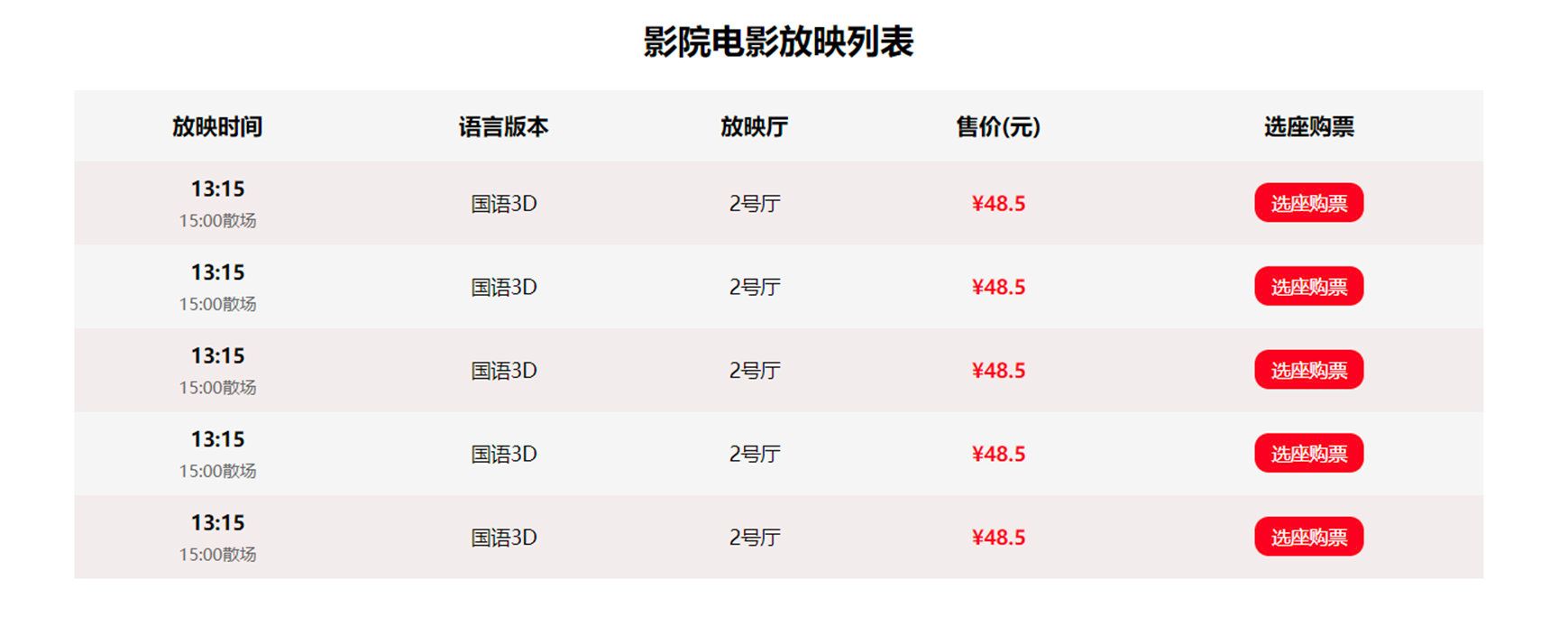
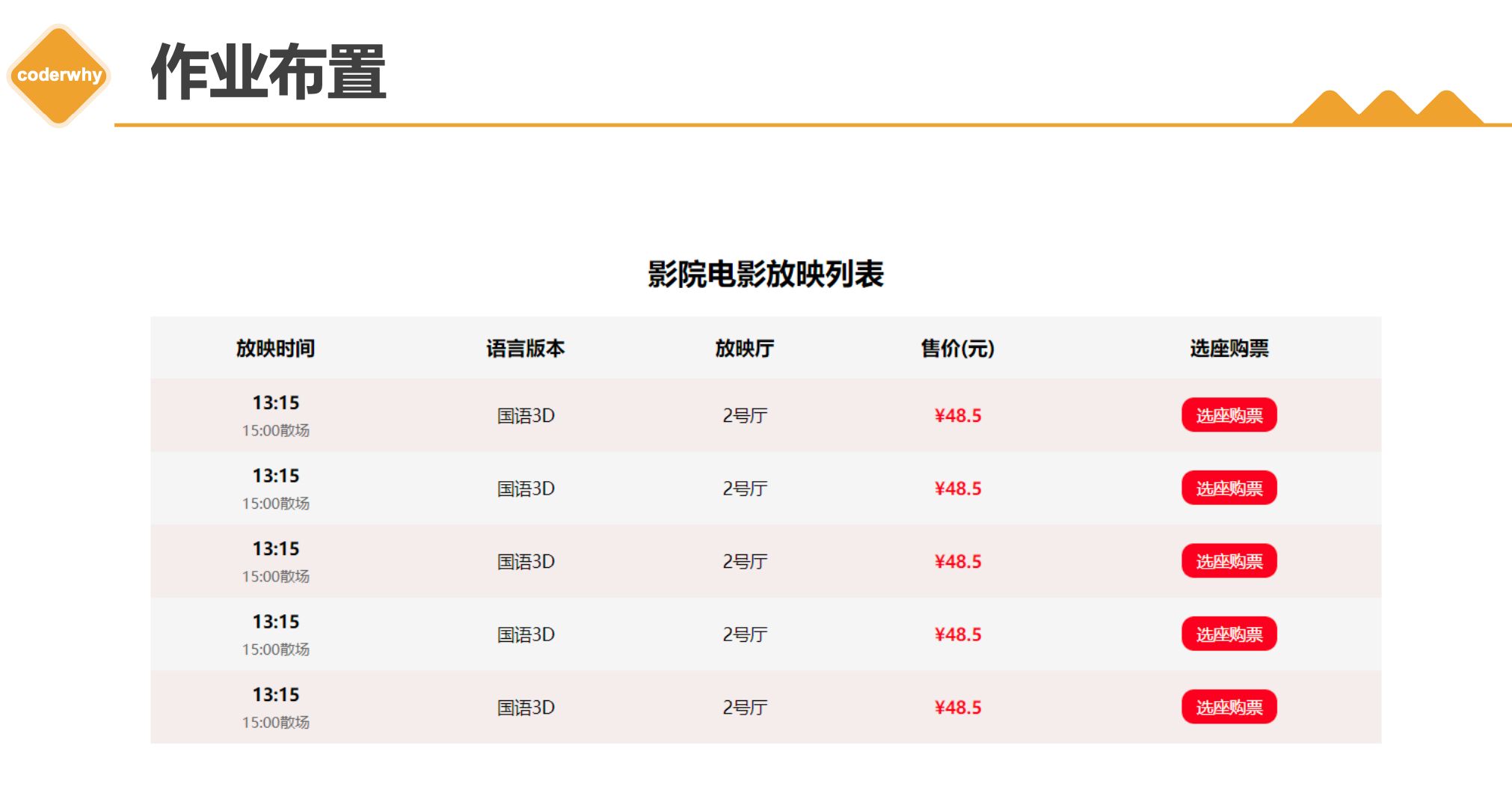
| ## 三. 完成table的作业内容 | |
| 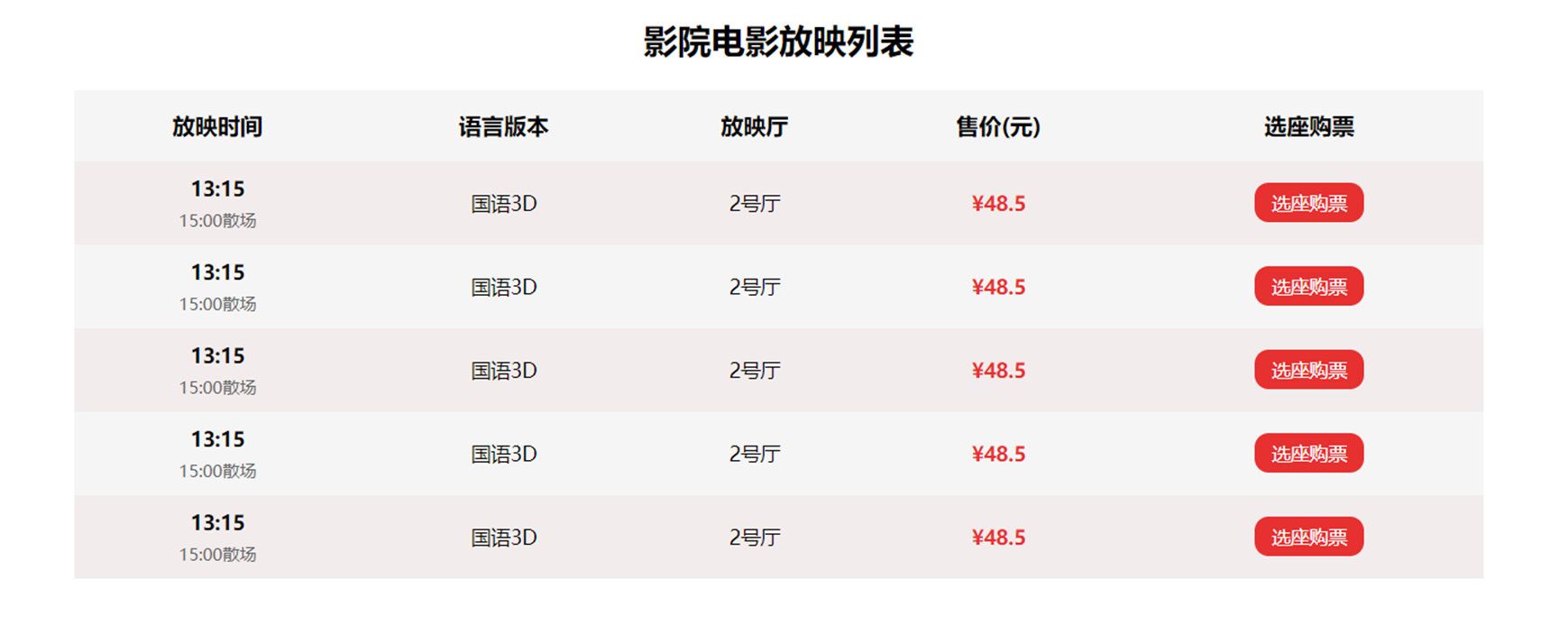 | |
| 图片见下方 | |
| ## 四. 说出表单元素什么情况下使用 `name` 和 `value` ? | |
| ## 五. 说出form提交时的属性作用 | |
| * action | |
| * method | |
| * target |
Day06 作业布置
一. 完成课堂所有的代码
盒子模型
- 08-盒子模型-margin
| <html lang="en"> | |
| <head> | |
| <meta charset="UTF-8" /> | |
| <meta http-equiv="X-UA-Compatible" content="IE=edge" /> | |
| <meta name="viewport" content="width=device-width, initial-scale=1.0" /> | |
| <title>Document</title> | |
| <style> | |
| /* 外边距margin:上右下左,一般用于兄弟元素之间的距离 */ | |
| /* padding一般用于父子元素之间的间距 */ | |
| /* 用inline-block会出现中间一条线(因为换行符),还会出现上下不齐 */ | |
| body { | |
| /* 解决inline-block问题 */ | |
| font-size: 0; | |
| } | |
| .one { | |
| display: inline-block; | |
| width: 300px; | |
| height: 300px; | |
| background-color: pink; | |
| /* 一个值:上下左右 */ | |
| /* margin: 30px; */ | |
| /* 两个值:上下 左右 */ | |
| /* margin: 10px 30px; */ | |
| /* 三个值 上 左右 下 */ | |
| margin: 10px 20px 30px; | |
| } | |
| .two { | |
| display: inline-block; | |
| width: 200px; | |
| height: 200px; | |
| background-color: #f00; | |
| } | |
| </style> | |
| </head> | |
| <body> | |
| <div class="one">我是第一个</div> | |
| <div class="two">我是第二个</div> | |
| </body> | |
| </html> | |
- 09-盒子模型-padding和margin对比
| <html lang="en"> | |
| <head> | |
| <meta charset="UTF-8" /> | |
| <meta http-equiv="X-UA-Compatible" content="IE=edge" /> | |
| <meta name="viewport" content="width=device-width, initial-scale=1.0" /> | |
| <title>Document</title> | |
| <style> | |
| /* 需求:子元素距离父元素左侧/上侧有一定的距离 */ | |
| /* 父子之间的距离用padding,兄弟之间的间距用margin */ | |
| .box { | |
| width: 500px; | |
| height: 500px; | |
| background-color: pink; | |
| /* 方式一:给父加padding,但是盒子会撑大,通过box-sizing */ | |
| /* padding: 20px 0 0 30px; | |
| box-sizing: border-box; */ | |
| /* 解决传递问题 */ | |
| overflow: auto; | |
| } | |
| .son { | |
| width: 200px; | |
| height: 200px; | |
| color: #fff; | |
| background-color: red; | |
| /* 方式二,给子元素加margin */ | |
| margin-left: 20px; | |
| /* 造成margin-top的传递 */ | |
| margin-top: 20px; | |
| } | |
| </style> | |
| </head> | |
| <body> | |
| <div class="box"> | |
| <div class="son">我是子元素</div> | |
| </div> | |
| </body> | |
| </html> | |
- 10-盒子模型-margin的传递
| <html lang="en"> | |
| <head> | |
| <meta charset="UTF-8" /> | |
| <meta http-equiv="X-UA-Compatible" content="IE=edge" /> | |
| <meta name="viewport" content="width=device-width, initial-scale=1.0" /> | |
| <title>Document</title> | |
| <style> | |
| /* 上下margin的传递 */ | |
| .father { | |
| width: 400px; | |
| height: 400px; | |
| background-color: red; | |
| /* 解决方式一 */ | |
| /* border: 1px solid rgba(0, 0, 0, 0); */ | |
| /* 方法二 */ | |
| /* overflow: auto; */ | |
| /* 方法三 加padding */ | |
| padding: 20px 0 0 0; | |
| } | |
| .son { | |
| width: 200px; | |
| height: 200px; | |
| background-color: pink; | |
| /* 当子元素(块)的顶线和父元素的顶部线重叠了,那子元素的margin-top传递给父元素 */ | |
| margin-top: 30px; | |
| /* 左右不会传递 */ | |
| margin-left: 10px; | |
| } | |
| </style> | |
| </head> | |
| <body> | |
| <div class="father"> | |
| <div class="son">我是子元素</div> | |
| </div> | |
| </body> | |
| </html> | |
- 11-盒子模型-margin-bottom的传递
| <html lang="en"> | |
| <head> | |
| <meta charset="UTF-8" /> | |
| <meta http-equiv="X-UA-Compatible" content="IE=edge" /> | |
| <meta name="viewport" content="width=device-width, initial-scale=1.0" /> | |
| <title>Document</title> | |
| <style> | |
| .father { | |
| width: 400px; | |
| height: auto; | |
| background-color: red; | |
| overflow: auto; | |
| } | |
| .son { | |
| width: 200px; | |
| height: 200px; | |
| background-color: pink; | |
| /* 当父元素的底线和子元素(块)的底线重叠时,并且父的height:auto, | |
| 那就会造成margin-bottom传递 */ | |
| margin-bottom: 20px; | |
| } | |
| </style> | |
| </head> | |
| <body> | |
| <div class="father"> | |
| <div class="son">我是子元素</div> | |
| </div> | |
| <div>今天愚人节</div> | |
| </body> | |
| </html> | |
- 12-盒子模型-margin的折叠
| <html lang="en"> | |
| <head> | |
| <meta charset="UTF-8" /> | |
| <meta http-equiv="X-UA-Compatible" content="IE=edge" /> | |
| <meta name="viewport" content="width=device-width, initial-scale=1.0" /> | |
| <title>Document</title> | |
| <style> | |
| .one { | |
| width: 400px; | |
| height: 400px; | |
| background-color: red; | |
| /* 上下兄弟的折叠 ,取较大值*/ | |
| /* 折叠就是垂直方向的兄弟元素,一个设置margin-bottom,一个设置margin-top,最后合并一个margin */ | |
| margin-bottom: 30px; | |
| } | |
| .two { | |
| width: 200px; | |
| height: 200px; | |
| background-color: pink; | |
| margin-top: 50px; | |
| /* 水平margin不折叠 */ | |
| } | |
| </style> | |
| </head> | |
| <body> | |
| <div class="one">大哥</div> | |
| <div class="two">二弟</div> | |
| </body> | |
| </html> | |
- 13-盒子模型-margin的折叠 父子之间
| <html lang="en"> | |
| <head> | |
| <meta charset="UTF-8" /> | |
| <meta http-equiv="X-UA-Compatible" content="IE=edge" /> | |
| <meta name="viewport" content="width=device-width, initial-scale=1.0" /> | |
| <title>Document</title> | |
| <style> | |
| .one { | |
| width: 400px; | |
| height: 400px; | |
| background-color: red; | |
| /* 父子块的折叠 ,取较大值*/ | |
| /* overflow: auto; */ | |
| margin-top: 30px; | |
| } | |
| .two { | |
| width: 200px; | |
| height: 200px; | |
| background-color: pink; | |
| margin-top: 50px; | |
| /* 水平margin不折叠 */ | |
| } | |
| </style> | |
| </head> | |
| <body> | |
| <div>红红火火恍恍惚惚或或或或或或或或或</div> | |
| <div class="one"> | |
| <div class="two">二弟</div> | |
| </div> | |
| </body> | |
| </html> | |
- 14-块级水平居中问题
| <html lang="en"> | |
| <head> | |
| <meta charset="UTF-8" /> | |
| <meta http-equiv="X-UA-Compatible" content="IE=edge" /> | |
| <meta name="viewport" content="width=device-width, initial-scale=1.0" /> | |
| <title>Document</title> | |
| <style> | |
| .one { | |
| width: 800px; | |
| height: 300px; | |
| background-color: red; | |
| text-align: center; | |
| } | |
| .two { | |
| width: 200px; | |
| height: 200px; | |
| background-color: pink; | |
| /* 水平居中方式一 */ | |
| /* margin: 0 auto; */ | |
| /* 方式二 */ | |
| display: inline-block; | |
| } | |
| </style> | |
| </head> | |
| <body> | |
| <div class="one"> | |
| <div class="two">二弟</div> | |
| </div> | |
| </body> | |
| </html> | |
- 15-外轮廓
| <html lang="en"> | |
| <head> | |
| <meta charset="UTF-8" /> | |
| <meta http-equiv="X-UA-Compatible" content="IE=edge" /> | |
| <meta name="viewport" content="width=device-width, initial-scale=1.0" /> | |
| <title>Document</title> | |
| <style> | |
| .box { | |
| width: 300px; | |
| height: 300px; | |
| background-color: pink; | |
| /* 外轮廓不占位置,和border设置一样 */ | |
| outline: 20px solid rgba(111, 59, 59, 0.8); | |
| } | |
| /* 给a设置样式,相当于给a的所有动态伪类都设置了 */ | |
| a, | |
| input { | |
| /* 通常给a和input去掉外轮廓 */ | |
| outline: none; | |
| } | |
| </style> | |
| </head> | |
| <body> | |
| <div class="box">外轮廓</div> | |
| <div>我是块</div> | |
| <span>hhhhhhhh</span> | |
| <a href="#">百度一下</a> | |
| <input type="text" /> | |
| </body> | |
| </html> | |
- 16-盒子阴影
| <html lang="en"> | |
| <head> | |
| <meta charset="UTF-8" /> | |
| <meta http-equiv="X-UA-Compatible" content="IE=edge" /> | |
| <meta name="viewport" content="width=device-width, initial-scale=1.0" /> | |
| <title>Document</title> | |
| <style> | |
| .box { | |
| width: 300px; | |
| height: 300px; | |
| background-color: pink; | |
| margin: 50px auto; | |
| /* box-shadow:offset-x offset-y blue-radius spread-radius color inset; */ | |
| box-shadow: 20px 30px 5px 4px red inset, 100px 50px 4px 3px green; | |
| } | |
| </style> | |
| </head> | |
| <body> | |
| <div class="box">外轮廓</div> | |
| </body> | |
| </html> | |
- 17-文字阴影
| <html lang="en"> | |
| <head> | |
| <meta charset="UTF-8" /> | |
| <meta http-equiv="X-UA-Compatible" content="IE=edge" /> | |
| <meta name="viewport" content="width=device-width, initial-scale=1.0" /> | |
| <title>Document</title> | |
| <style> | |
| span { | |
| /* 文字阴影和盒子阴影差不多,少了向外延伸半径 和 inset */ | |
| text-shadow: 20px 30px 4px blue; | |
| } | |
| </style> | |
| </head> | |
| <body> | |
| <span>文字阴影</span> | |
| </body> | |
| </html> | |
- 18-行内非替换元素的特殊性
| <html lang="en"> | |
| <head> | |
| <meta charset="UTF-8" /> | |
| <meta http-equiv="X-UA-Compatible" content="IE=edge" /> | |
| <meta name="viewport" content="width=device-width, initial-scale=1.0" /> | |
| <title>Document</title> | |
| <style> | |
| .box { | |
| width: 200px; | |
| height: 200px; | |
| background-color: pink; | |
| } | |
| span { | |
| margin-top: 20px; | |
| margin-bottom: 30px; | |
| padding: 30px 50px; | |
| border: 20px solid #666; | |
| /* 行内非替换元素对width,height,margin上下无效 ,但是对border上下,padding上下有特殊,会撑开盒子,但是不占空间 */ | |
| } | |
| </style> | |
| </head> | |
| <body> | |
| <div class="box">11</div> | |
| <a href="#">百度一下</a> | |
| <span> | |
| width、height、margin-top、margin-bottom对行内级非替换元素不起作用</span | |
| > | |
| <a href="#">谷歌</a> | |
| <div class="box">hhhhh</div> | |
| </body> | |
| </html> | |
- 19-前景色和背景设置的哪些
| <html lang="en"> | |
| <head> | |
| <meta charset="UTF-8" /> | |
| <meta http-equiv="X-UA-Compatible" content="IE=edge" /> | |
| <meta name="viewport" content="width=device-width, initial-scale=1.0" /> | |
| <title>Document</title> | |
| <style> | |
| .box { | |
| width: 200px; | |
| height: 200px; | |
| background-color: green; | |
| border: 10px solid; | |
| /* 如果没有设置border颜色,那就用color前景色代替 */ | |
| color: pink; | |
| } | |
| </style> | |
| </head> | |
| <body> | |
| <div class="box">111</div> | |
| </body> | |
| </html> | |
- 20-box-sizing
| <html lang="en"> | |
| <head> | |
| <meta charset="UTF-8" /> | |
| <meta http-equiv="X-UA-Compatible" content="IE=edge" /> | |
| <meta name="viewport" content="width=device-width, initial-scale=1.0" /> | |
| <title>Document</title> | |
| <style> | |
| .box, | |
| .one { | |
| /* content-box:width指的是内容的宽度,盒子实际占据的宽度=width+padding+border padding、border都布置在width、height外边 */ | |
| /* border-box:width指的是盒子实际占据的宽度 padding、border都布置在width、height里边,*/ | |
| width: 200px; | |
| height: 200px; | |
| background-color: green; | |
| border: 10px solid pink; | |
| padding: 20px; | |
| } | |
| .one { | |
| box-sizing: border-box; | |
| } | |
| </style> | |
| </head> | |
| <body> | |
| <div class="box">111</div> | |
| <div class="one">111</div> | |
| </body> | |
| </html> | |
- 21-案例新人福利
| <html lang="en"> | |
| <head> | |
| <meta charset="UTF-8" /> | |
| <meta http-equiv="X-UA-Compatible" content="IE=edge" /> | |
| <meta name="viewport" content="width=device-width, initial-scale=1.0" /> | |
| <title>Document</title> | |
| <link rel="stylesheet" href="./css/reset.css" /> | |
| <style> | |
| .item { | |
| display: inline-block; | |
| width: 70px; | |
| height: 25px; | |
| text-align: center; | |
| line-height: 25px; | |
| border-radius: 13px; | |
| } | |
| .new { | |
| color: #fff; | |
| background-color: #e1251b; | |
| } | |
| .vip { | |
| color: #e5d790; | |
| background-color: #363634; | |
| } | |
| a:hover { | |
| background-color: #c81623; | |
| color: #fff; | |
| } | |
| </style> | |
| </head> | |
| <body> | |
| <a | |
| href="https://xinren.jd.com/?channel=99#/home" | |
| class="item new" | |
| target="_blank" | |
| >新人福利</a | |
| > | |
| <a | |
| href="https://passport.jd.com/new/login.aspx" | |
| class="item vip" | |
| target="_blank" | |
| >PLUS会员</a | |
| > | |
| </body> | |
| </html> | |
- 22-模仿小米案例
| <html lang="en"> | |
| <head> | |
| <meta charset="UTF-8" /> | |
| <meta http-equiv="X-UA-Compatible" content="IE=edge" /> | |
| <meta name="viewport" content="width=device-width, initial-scale=1.0" /> | |
| <link rel="stylesheet" href="css/reset.css" /> | |
| <link rel="stylesheet" href="css/xiaomi.css" /> | |
| <title>Document</title> | |
| </head> | |
| <body> | |
| <a href="https://www.mi.com/xiaomipad5pro" class="item"> | |
| <img src="../image/xiaomi01.webp" class="alblm" /> | |
| <h3 class="title">小米平板5 Pro</h3> | |
| <p class="desc"> | |
| 全新12代英特尔处理器,CNC一体精雕工艺,2.5K | |
| 120Hz高清屏,可选MX550独立显卡 | |
| </p> | |
| <div class="price"> | |
| <span class="old-price">2399元起</span> | |
| <span class="new-price">2499元</span> | |
| </div> | |
| </a> | |
| </body> | |
| </html> | |
- 23-B站案例
| <html lang="en"> | |
| <head> | |
| <meta charset="UTF-8" /> | |
| <meta http-equiv="X-UA-Compatible" content="IE=edge" /> | |
| <meta name="viewport" content="width=device-width, initial-scale=1.0" /> | |
| <title>Document</title> | |
| <link rel="stylesheet" href="./css/reset.css" /> | |
| <style> | |
| a { | |
| display: block; | |
| } | |
| .item { | |
| width: 300px; | |
| margin: 100px auto; | |
| } | |
| .item .album img { | |
| width: 100%; | |
| border-radius: 5px; | |
| } | |
| .item .info h3 { | |
| font-size: 15px; | |
| margin-top: 8px; | |
| /* 单行显示省略号 */ | |
| /* white-space: nowrap; */ | |
| /* 多行显示省略号 */ | |
| display: -webkit-box; | |
| -webkit-line-clamp: 2; | |
| -webkit-box-orient: vertical; | |
| overflow: hidden; | |
| text-overflow: ellipsis; | |
| } | |
| .item .anchor { | |
| font-size: 13px; | |
| color: #888; | |
| margin-top: 5px; | |
| } | |
| .item .nickname::before { | |
| content: url(../image/widget-up.svg); | |
| display: inline-block; | |
| width: 16px; | |
| height: 16px; | |
| position: relative; | |
| top: 1px; | |
| margin-right: 8px; | |
| } | |
| </style> | |
| </head> | |
| <body> | |
| <div class="item"> | |
| <div class="album"> | |
| <a href="#" | |
| ><img | |
| src="https://i0.hdslb.com/bfs/archive/9c763bf06b7765462eac62cc0a9a34b260d3f9c8.jpg@672w_378h_1c.webp" | |
| referrerpolicy="no-referrer" | |
| /></a> | |
| </div> | |
| <div class="info"> | |
| <a href="#"> | |
| <h3> | |
| 萌化了!谁会不喜欢毛茸茸的小懒懒呢?萌化了!谁会不喜欢毛茸茸的小懒懒呢?萌化了!谁会不喜欢毛茸茸的小懒懒呢?萌化了!谁会不喜欢毛茸茸的小懒懒呢? | |
| </h3> | |
| </a> | |
| <a href="" class="anchor"> | |
| <span class="nickname">Muxi慕喜咩</span> | |
| <span class="time">3-20</span> | |
| </a> | |
| </div> | |
| </div> | |
| </body> | |
| </html> | |
二.CSS-背景
- 01-背景图片
| <html lang="en"> | |
| <head> | |
| <meta charset="UTF-8" /> | |
| <meta http-equiv="X-UA-Compatible" content="IE=edge" /> | |
| <meta name="viewport" content="width=device-width, initial-scale=1.0" /> | |
| <title>Document</title> | |
| <style> | |
| .box { | |
| width: 1000px; | |
| height: 500px; | |
| background-color: pink; | |
| background-image: url(../image/diqiu.jpg), url(../image/lyf.png); | |
| background-repeat: no-repeat; | |
| } | |
| </style> | |
| </head> | |
| <body> | |
| <div class="box">哈哈哈</div> | |
| </body> | |
| </html> | |
- 02-背景平铺
| <html lang="en"> | |
| <head> | |
| <meta charset="UTF-8" /> | |
| <meta http-equiv="X-UA-Compatible" content="IE=edge" /> | |
| <meta name="viewport" content="width=device-width, initial-scale=1.0" /> | |
| <title>Document</title> | |
| <style> | |
| .box { | |
| width: 1000px; | |
| height: 800px; | |
| background-color: pink; | |
| background-image: url(../image/diqiu.jpg); | |
| /* 背景平铺,默认repeat */ | |
| background-repeat: no-repeat; | |
| background-repeat: repeat-x; | |
| background-repeat: repeat-y; | |
| } | |
| </style> | |
| </head> | |
| <body> | |
| <div class="box">哈哈哈</div> | |
| </body> | |
| </html> | |
- 03-背景平铺练习
| <html lang="en"> | |
| <head> | |
| <meta charset="UTF-8" /> | |
| <meta http-equiv="X-UA-Compatible" content="IE=edge" /> | |
| <meta name="viewport" content="width=device-width, initial-scale=1.0" /> | |
| <title>Document</title> | |
| <style> | |
| .box { | |
| width: 300px; | |
| height: 300px; | |
| /* 默认平铺 */ | |
| background-image: url(../image/wall.png); | |
| } | |
| </style> | |
| </head> | |
| <body> | |
| <div class="box"></div> | |
| </body> | |
| </html> | |
- 04-背景位置
| <html lang="en"> | |
| <head> | |
| <meta charset="UTF-8" /> | |
| <meta http-equiv="X-UA-Compatible" content="IE=edge" /> | |
| <meta name="viewport" content="width=device-width, initial-scale=1.0" /> | |
| <title>Document</title> | |
| <style> | |
| .box { | |
| width: 1000px; | |
| height: 500px; | |
| background-color: pink; | |
| background-image: url(../image/diqiu.jpg); | |
| background-repeat: no-repeat; | |
| background-position: 20px 60px; | |
| /* 水平方向还可以设值:left、center、right */ | |
| /* 垂直方向还可以设值:top、center、bottom */ | |
| background-position: left bottom; | |
| /*只设置了1个方向,另一个方向默认是cente*/ | |
| background-position: right; | |
| } | |
| </style> | |
| </head> | |
| <body> | |
| <div class="box">哈哈哈</div> | |
| </body> | |
| </html> | |
- 05-背景尺寸
| <html lang="en"> | |
| <head> | |
| <meta charset="UTF-8" /> | |
| <meta http-equiv="X-UA-Compatible" content="IE=edge" /> | |
| <meta name="viewport" content="width=device-width, initial-scale=1.0" /> | |
| <title>Document</title> | |
| <style> | |
| .box { | |
| width: 1000px; | |
| height: 500px; | |
| background-color: pink; | |
| background-image: url(../image/diqiu.jpg); | |
| background-repeat: no-repeat; | |
| /* 默认 */ | |
| background-size: auto; | |
| /* contain:一边铺满,但是图片保持宽高比 */ | |
| background-size: contain; | |
| /* cover 完全覆盖元素,可能背景图片部分看不见 */ | |
| background-size: cover; | |
| /* 百分比,相对于背景区 */ | |
| background-size: 50% 40%; | |
| background-size: 100px 200px; | |
| } | |
| </style> | |
| </head> | |
| <body> | |
| <div class="box">哈哈哈</div> | |
| </body> | |
| </html> | |
- 05-背景位置练习
| <html lang="en"> | |
| <head> | |
| <meta charset="UTF-8" /> | |
| <meta http-equiv="X-UA-Compatible" content="IE=edge" /> | |
| <meta name="viewport" content="width=device-width, initial-scale=1.0" /> | |
| <title>Document</title> | |
| <style> | |
| body { | |
| padding: 0; | |
| margin: 0; | |
| } | |
| .box { | |
| width: 300px; | |
| height: 200px; | |
| background-image: url(../image/mhxy.jpg); | |
| background-repeat: no-repeat; | |
| background-position: center; | |
| } | |
| </style> | |
| </head> | |
| <body> | |
| <div class="box"></div> | |
| </body> | |
| </html> | |
- 06-背景附加
| <html lang="en"> | |
| <head> | |
| <meta charset="UTF-8" /> | |
| <meta http-equiv="X-UA-Compatible" content="IE=edge" /> | |
| <meta name="viewport" content="width=device-width, initial-scale=1.0" /> | |
| <title>Document</title> | |
| <style> | |
| body { | |
| padding: 0; | |
| margin: 0; | |
| } | |
| .box { | |
| width: 300px; | |
| height: 200px; | |
| background-image: url(../image/mhxy.jpg); | |
| background-repeat: no-repeat; | |
| /*scroll背景不随内容滚动 */ | |
| background-attachment: scroll; | |
| /* 背景随内容滚动 */ | |
| background-attachment: local; | |
| background-attachment: fixed; | |
| overflow: scroll; | |
| /* 缩写 */ | |
| /* background: url(../image/mhxy.jpg) no-repeat center/cover scroll; */ | |
| } | |
| </style> | |
| </head> | |
| <body> | |
| <div class="box"> | |
| 习近平指出,8年前,我提出中国愿同欧洲一道打造中欧和平、增长、改革、文明四大伙伴关系,中方的这一愿景至今未改变,当前形势下更有现实意义。中欧有着广泛共同利益和深厚合作基础,中方对欧政策保持稳定连贯,希望欧方形成自主的对华认知,奉行自主的对华政策,同中方一道,推动中欧关系行稳致远,为动荡的世界局势提供一些稳定因素。 | |
| </div> | |
| <br /><br /><br /><br /><br /> | |
| <br /><br /><br /><br /><br /> | |
| <br /><br /><br /><br /><br /> | |
| <br /><br /><br /><br /><br /> | |
| <br /><br /><br /><br /><br /> | |
| <br /><br /><br /><br /><br /> | |
| <br /><br /><br /><br /><br /> | |
| <br /><br /><br /><br /><br /> | |
| <br /><br /><br /><br /><br /> | |
| <br /><br /><br /><br /><br /> | |
| </body> | |
| </html> | |
二. 写出盒子模型包含的内容以及如何设置
盒子模型里包含
- 内容
- 通过宽度和高度设置
- 内边距
- 通过padding设置
- padding: padding-top padding-right padding-bottom padding-left;
- 边框
- 通过border设置
- border: border-width border-style border-color
- 外边距
- 通过margin设置
- margin: margin-top margin-right margin-bottom margin-left
三. 说说你对margin的传递和折叠的理解
margin的传递一般是父子块元素之间,有margin-top传递,margin-bottom传递.
- margin-top传递: 当块级元素的顶部线和父元素的顶部线重叠,那么这个块级元素的margin-top值会传递给父元素
- margin-bottom传递:当块级元素的底部线和父元素的底部线重叠,那么这个块级元素的margin-bottom值会传递给父元素
折叠: 指的是 垂直方向上相邻的2个margin(margin-top、margin-bottom)有可能会合并为1个margin.
它有两个兄弟块级元素之间的上下margin的折叠,也有父子块元素之间的margin折叠
四. 行内非替换元素在设置padding/border的上下时,有什么特殊的地方?
上下会被撑起来,但是不占空间
五. 整理box-sizing的作用,以及content-box和border-box的区别
box-sizing用来设置盒子模型中宽高的行为
content-box: padding、border都布置在width、height外边
border-box: padding、border都布置在width、height里边
六. 说出元素水平居中的方案以及对应的场景
行内块元素(包括inline-block元素)
- 水平居中:在父元素中设置text-align: center
块级元素
- 水平居中:margin:0 auto;
七. 练习background-position和background-size(为精灵图做准备)
- background-position
| <html lang="en"> | |
| <head> | |
| <meta charset="UTF-8" /> | |
| <meta http-equiv="X-UA-Compatible" content="IE=edge" /> | |
| <meta name="viewport" content="width=device-width, initial-scale=1.0" /> | |
| <title>Document</title> | |
| <style> | |
| .box { | |
| width: 1000px; | |
| height: 500px; | |
| background-color: pink; | |
| background-image: url(../image/diqiu.jpg); | |
| background-repeat: no-repeat; | |
| background-position: 20px 60px; | |
| /* 水平方向还可以设值:left、center、right */ | |
| /* 垂直方向还可以设值:top、center、bottom */ | |
| background-position: left bottom; | |
| /*只设置了1个方向,另一个方向默认是cente*/ | |
| background-position: right; | |
| } | |
| </style> | |
| </head> | |
| <body> | |
| <div class="box">哈哈哈</div> | |
| </body> | |
| </html> |
- background-size
| <html lang="en"> | |
| <head> | |
| <meta charset="UTF-8" /> | |
| <meta http-equiv="X-UA-Compatible" content="IE=edge" /> | |
| <meta name="viewport" content="width=device-width, initial-scale=1.0" /> | |
| <title>Document</title> | |
| <style> | |
| .box { | |
| width: 1000px; | |
| height: 500px; | |
| background-color: pink; | |
| background-image: url(../image/diqiu.jpg); | |
| background-repeat: no-repeat; | |
| /* 默认 */ | |
| background-size: auto; | |
| /* contain:一边铺满,但是图片保持宽高比 */ | |
| background-size: contain; | |
| /* cover 完全覆盖元素,可能背景图片部分看不见 */ | |
| background-size: cover; | |
| /* 百分比,相对于背景区 */ | |
| background-size: 50% 40%; | |
| background-size: 100px 200px; | |
| } | |
| </style> | |
| </head> | |
| <body> | |
| <div class="box">哈哈哈</div> | |
| </body> | |
| </html> | |
八. 找出三个盒子模型的综合案例进行练习
务必下载!!
今日的代码和讲义 以及思维导图:【点击此链接下载 Day07.zip】
大纲
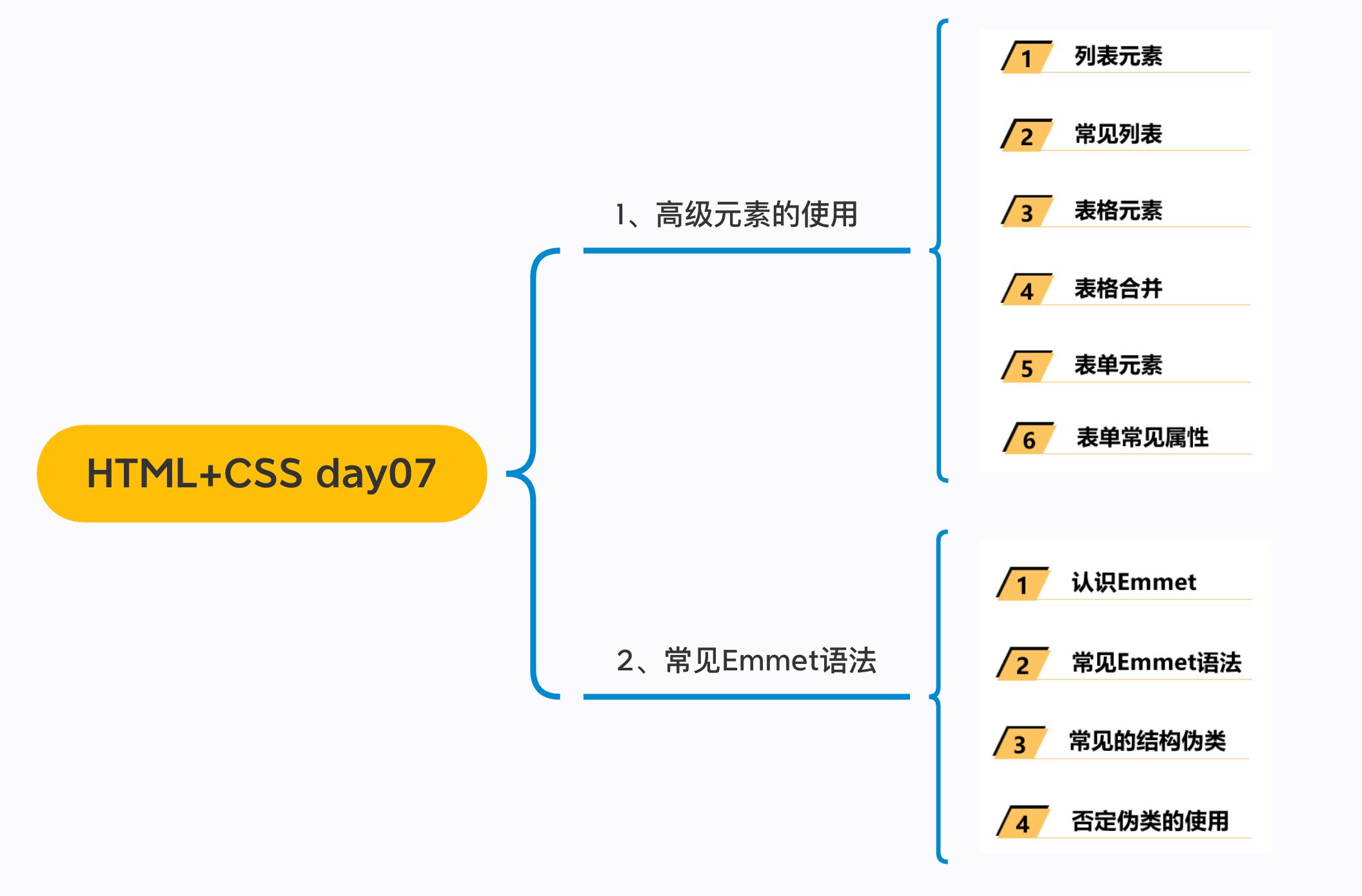
一. 列表元素
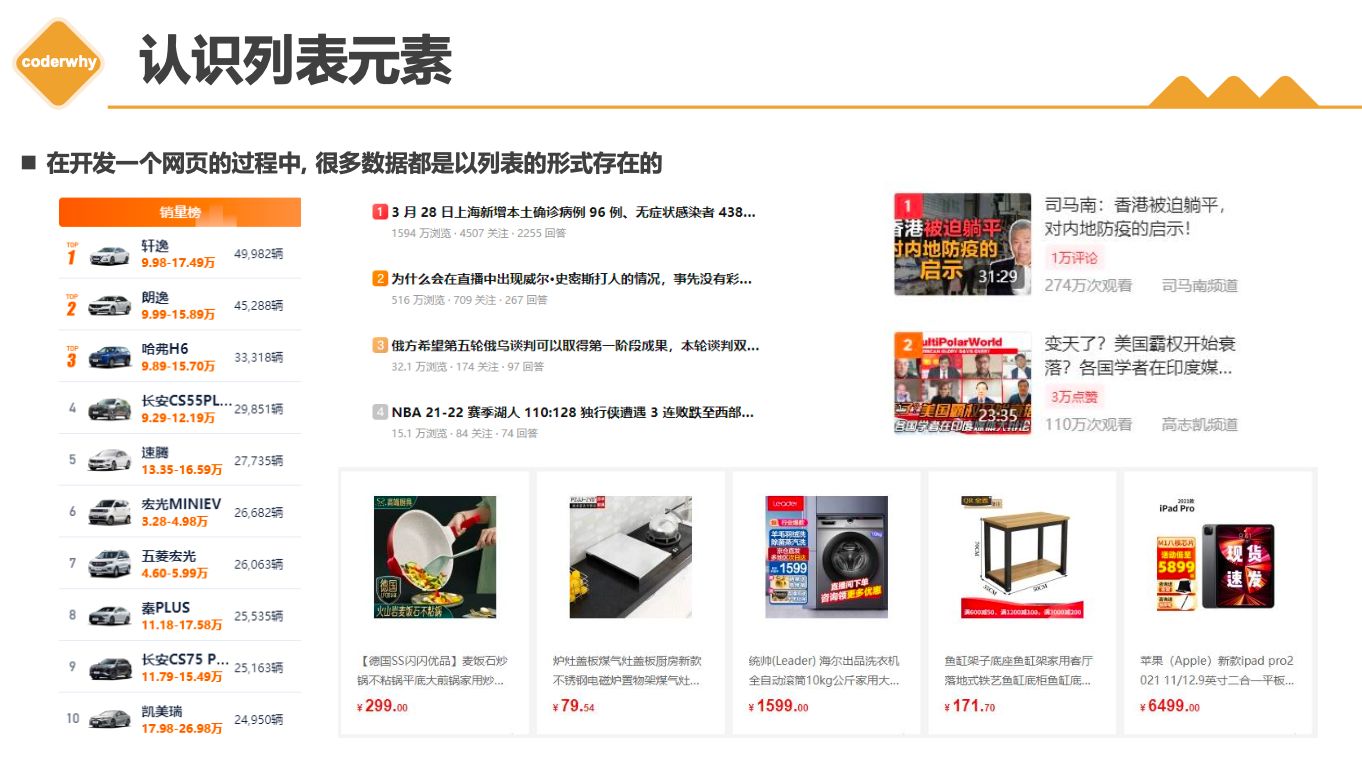
列表的实现方式
事实上现在很多的列表功能采用了不同的方案来实现:
- 方案一: 使用div元素来实现(比如汽车之家, 知乎上的很多列表)
- 方案二: 使用列表元素, 使用元素语义化的方式实现;
事实上现在很多的网站对于列表元素没有很强烈的偏好,更加不拘一格,按照自己的风格来布局:
- 原因是列表元素默认的CSS样式, 让它用起来不是非常方便;
- 比如列表元素往往有很多的限制,
ul/ol中只能存放li,li再存放其他元素, 默认样式等; - 虽然我们可以通过重置来解决, 但是我们更喜欢自由的
div;
HTML提供了
3组常用的用来展示列表的元素- 有序列表:
ol、li - 无序列表:
ul、li - 定义列表:
dl、dt、dd
- 有序列表:
1.1. 三种列表
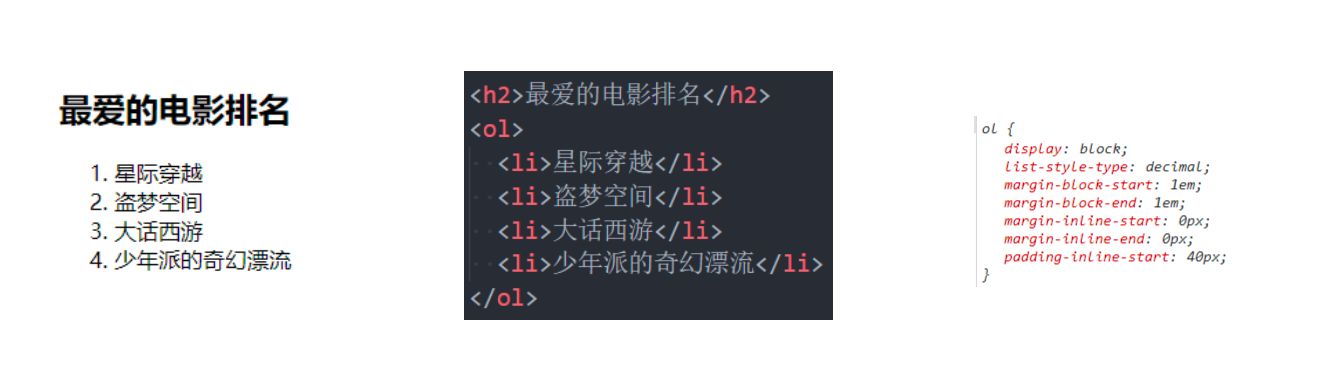
有序列表 – ol – li
| * ol > li | |
| * ul > li | |
| * dl > dt > dd |
ol(ordered list)有序列表,直接子元素只能是li
li(list item)- 列表中的每一项
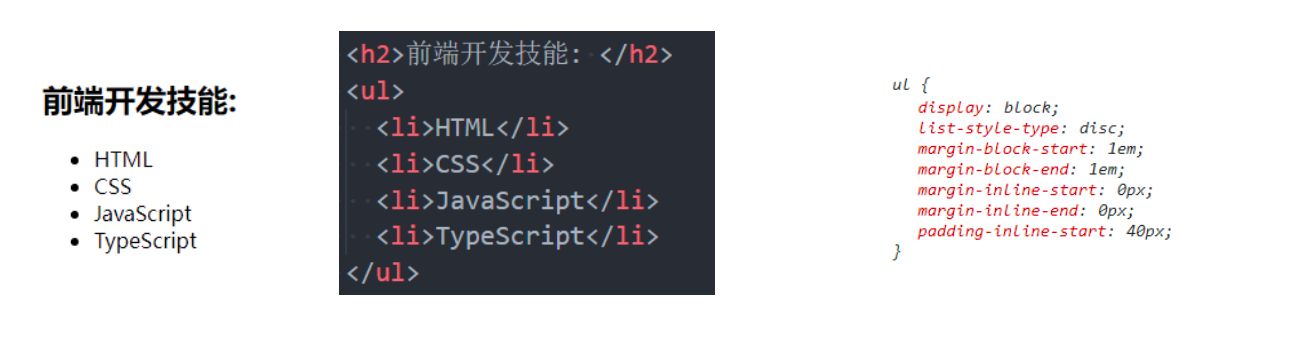
无序列表 – ul - li
ul(unordered list)- 无序列表,直接子元素只能是li
li(list item)- 列表中的每一项
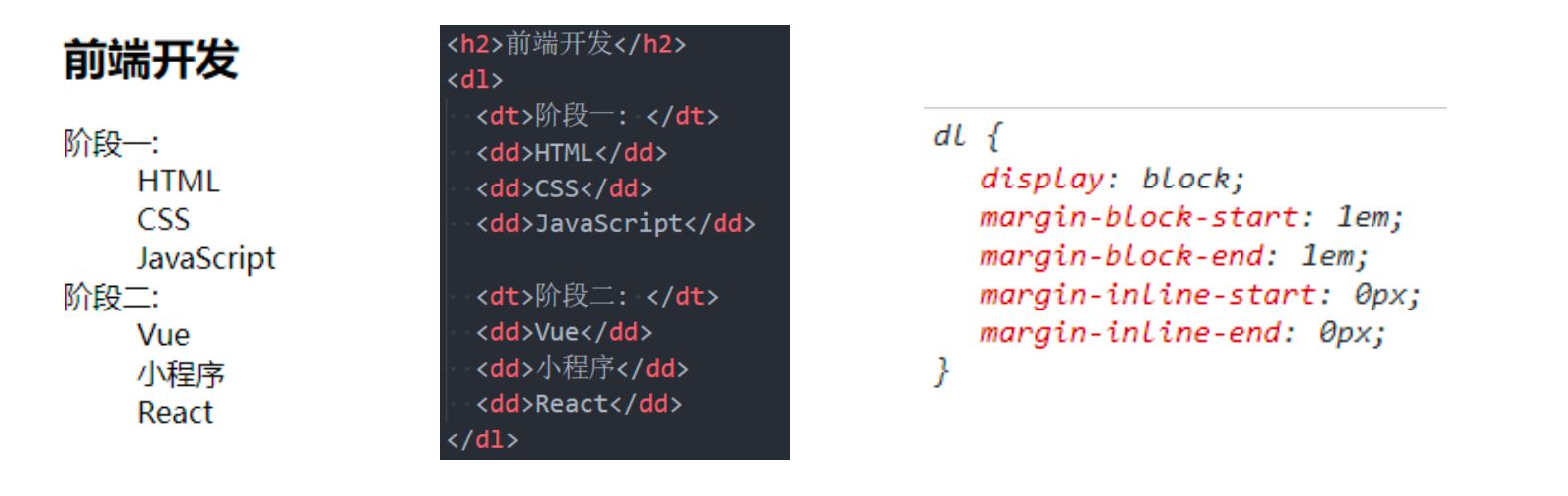
定义列表 – dl – dt - dd
dl(
definition list)- 定义列表,直接子元素只能是
dt、dd
- 定义列表,直接子元素只能是
dt(definition term)term是项的意思, 列表中每一项的项目名
dd(definition description)- 列表中每一项的具体描述,是对
dt的描述、解释、补充 - 一个
dt后面一般紧跟着1个或者多个dd
- 列表中每一项的具体描述,是对
1.2. 列表案例
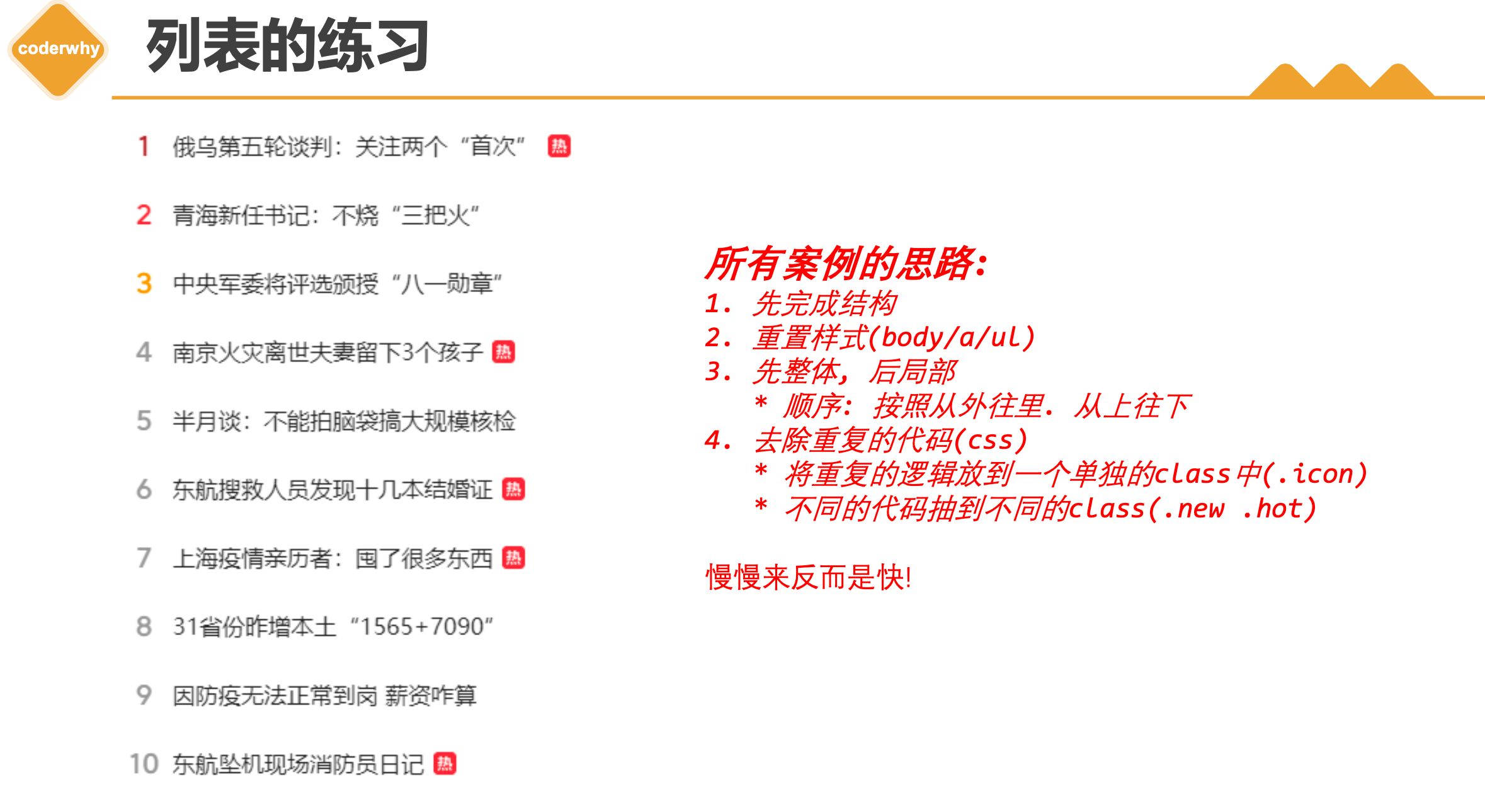
- 总结思路
二. table元素
- 在网页中,对于某些内容的展示使用表格元素更为合适和方便
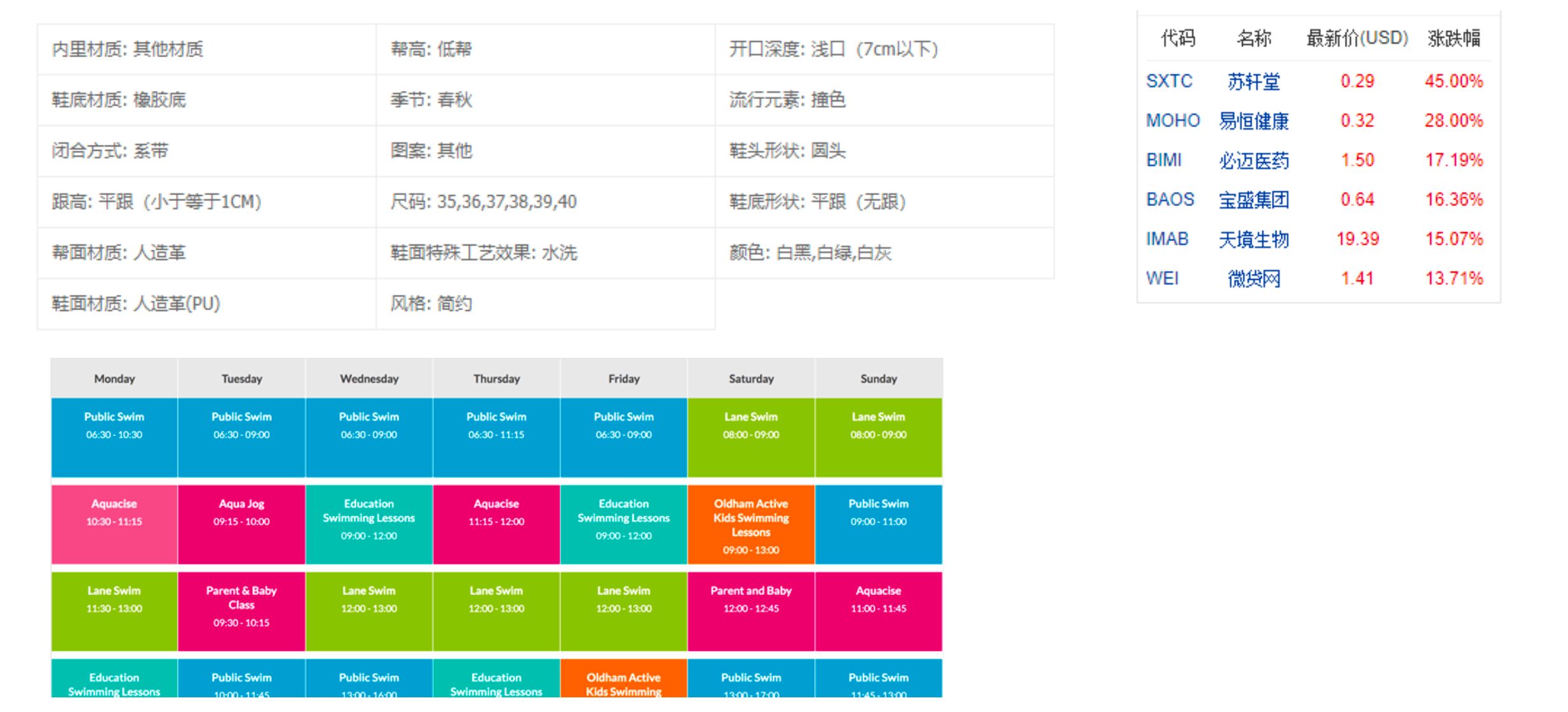
2.1. table常见
| * table | |
| * tr | |
| * td |
- 编写表格最常见的是下面的元素:
table- 表格
tr(table row)- 表格中的行
td(table data)- 行中的单元格
- 另外表格有很多相关的属性可以设置表格的样式, 但是已经不推荐使用了
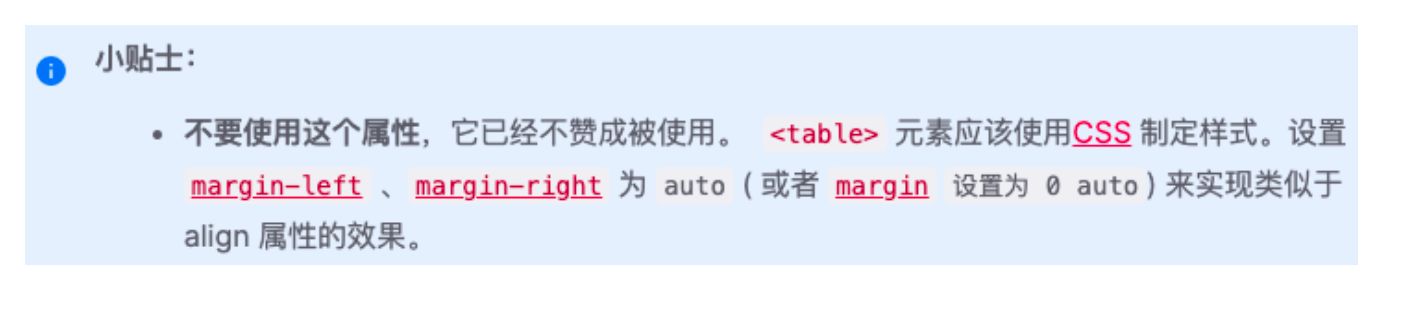
2.2. 案例练习
股票表格
| table { | |
| border-collapse: collapse; | |
| } |
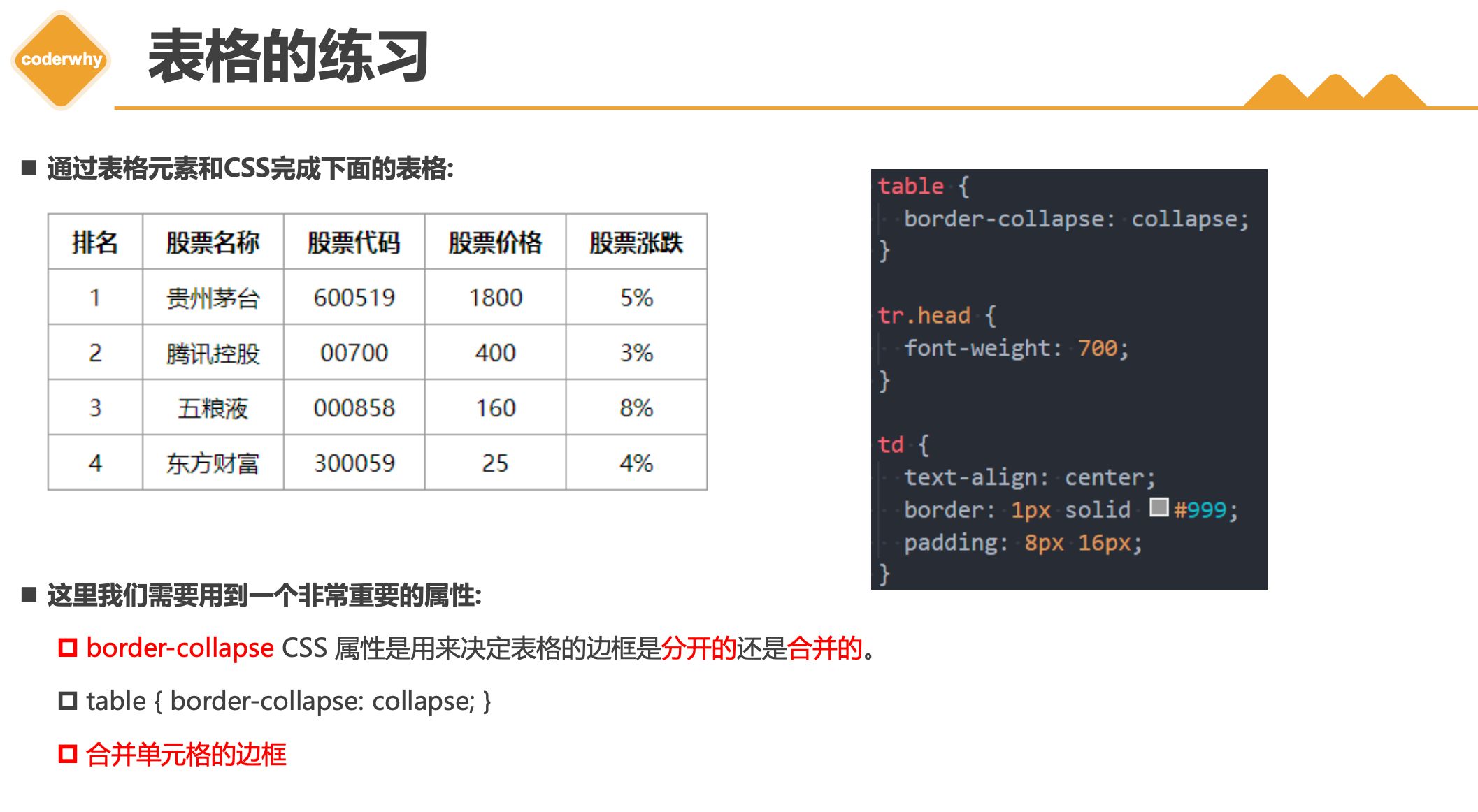
这里我们需要用到一个非常重要的属性:
border-collapseCSS 属性是用来决定表格的边框是分开的还是合并的。table { border-collapse: collapse; }合并单元格的边框
2.3. table元素
| * thead | |
| * tbody | |
| * tfoot | |
| * caption | |
| * th |
thead- 表格的表头
tbody- 表格的主体
tfoot- 表格的页脚
caption- 表格的标题
th- 表格的表头单元格
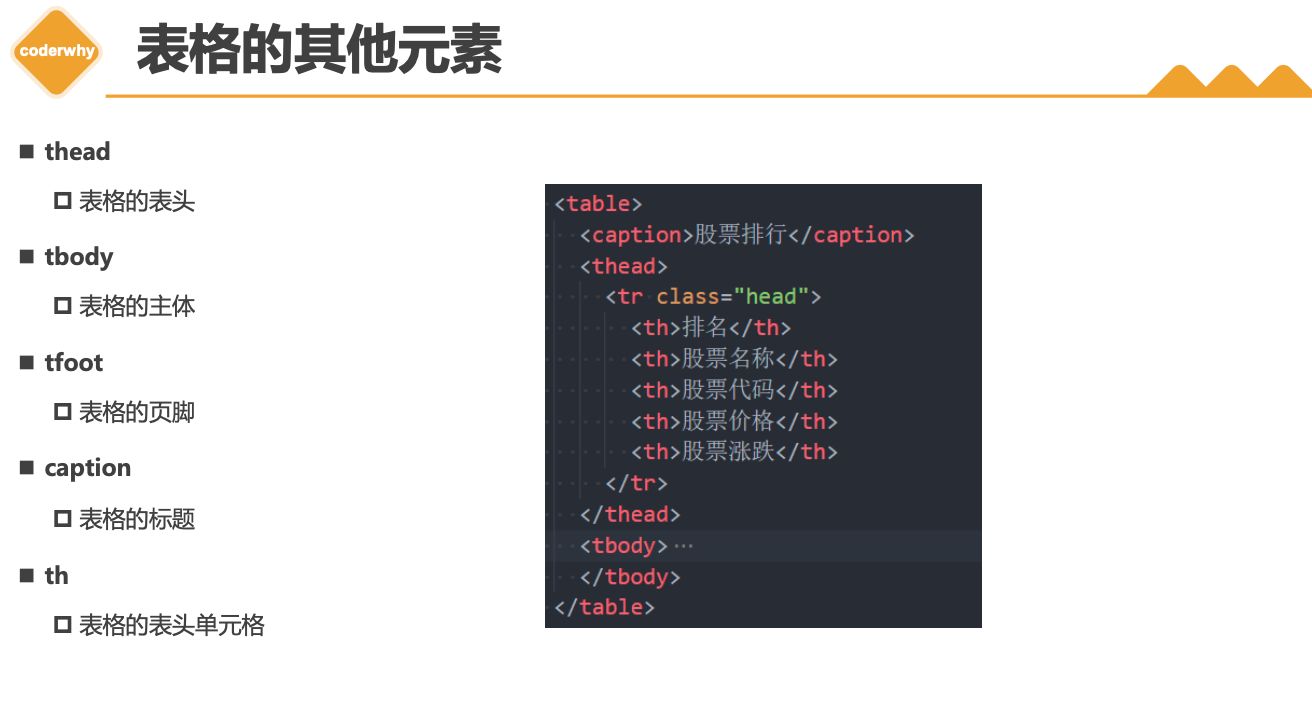
2.4. 单元格合并
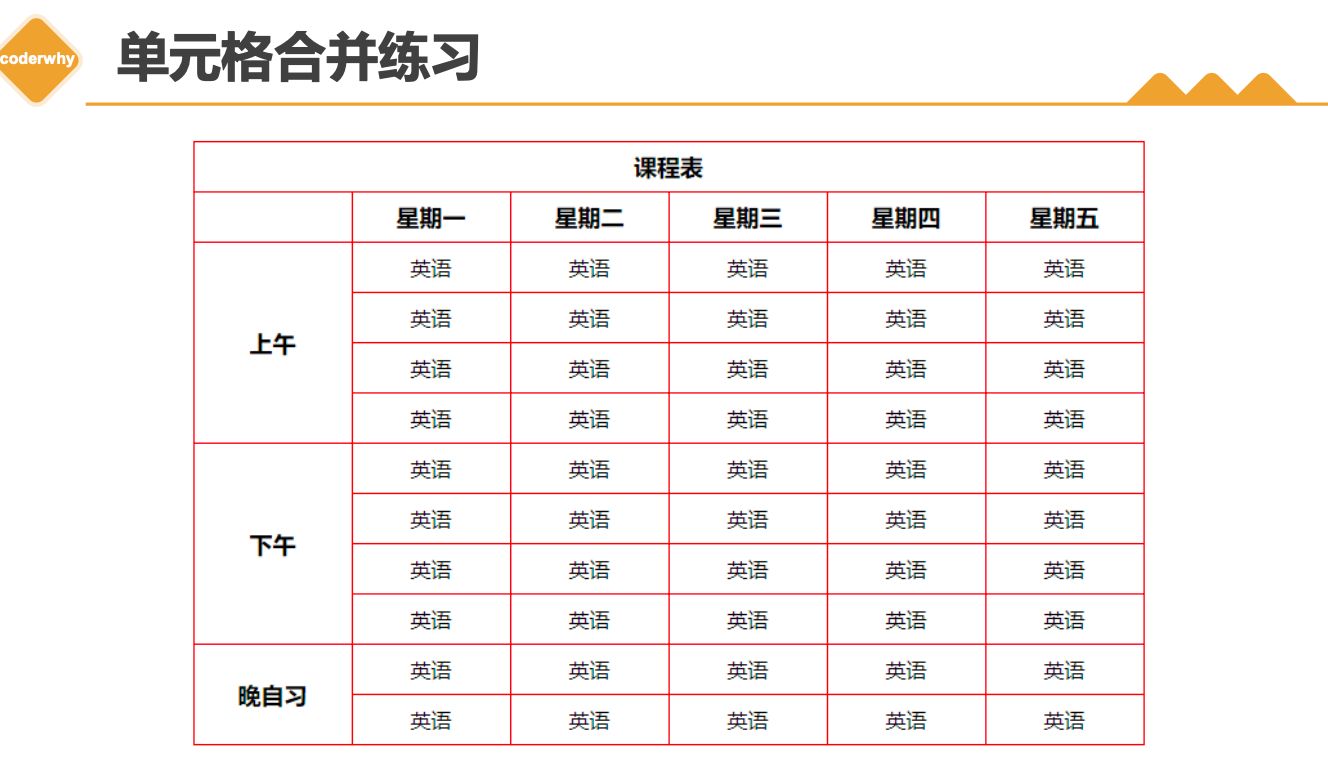
| * colspan | |
| * rowspan | |
| * 练习: 课程表 |
- 在某些特殊的情况下, 每个单元格占据的大小可能并不是固定的
- 一个单元格可能会
跨多行或者多列来使用;
- 一个单元格可能会
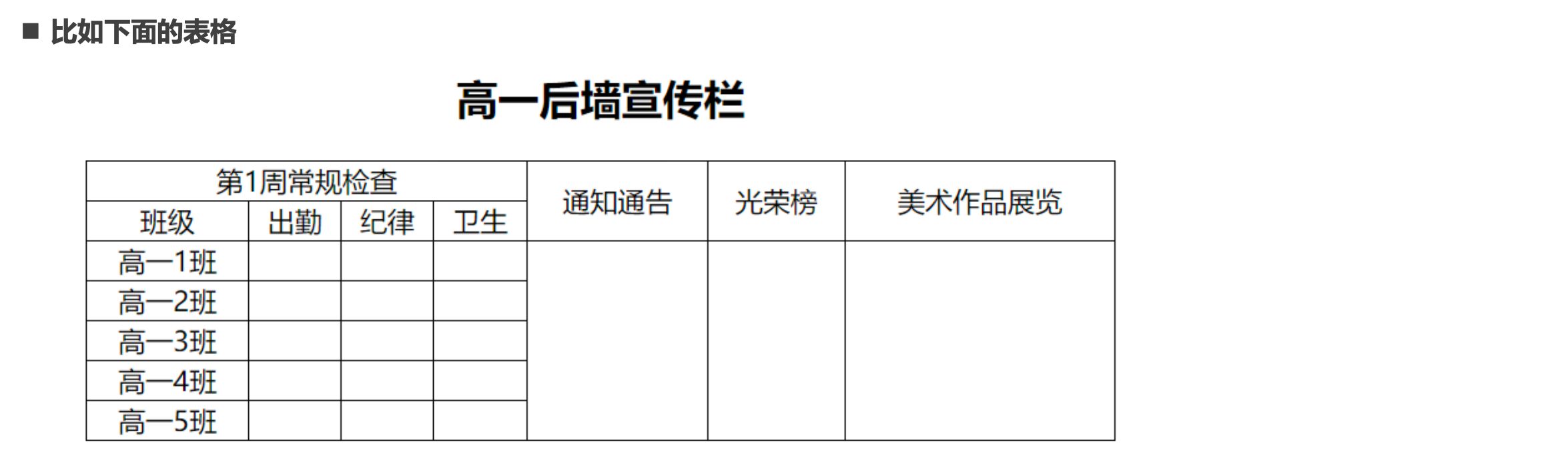
- 这个时候我们就要使用单元格合并来完成;
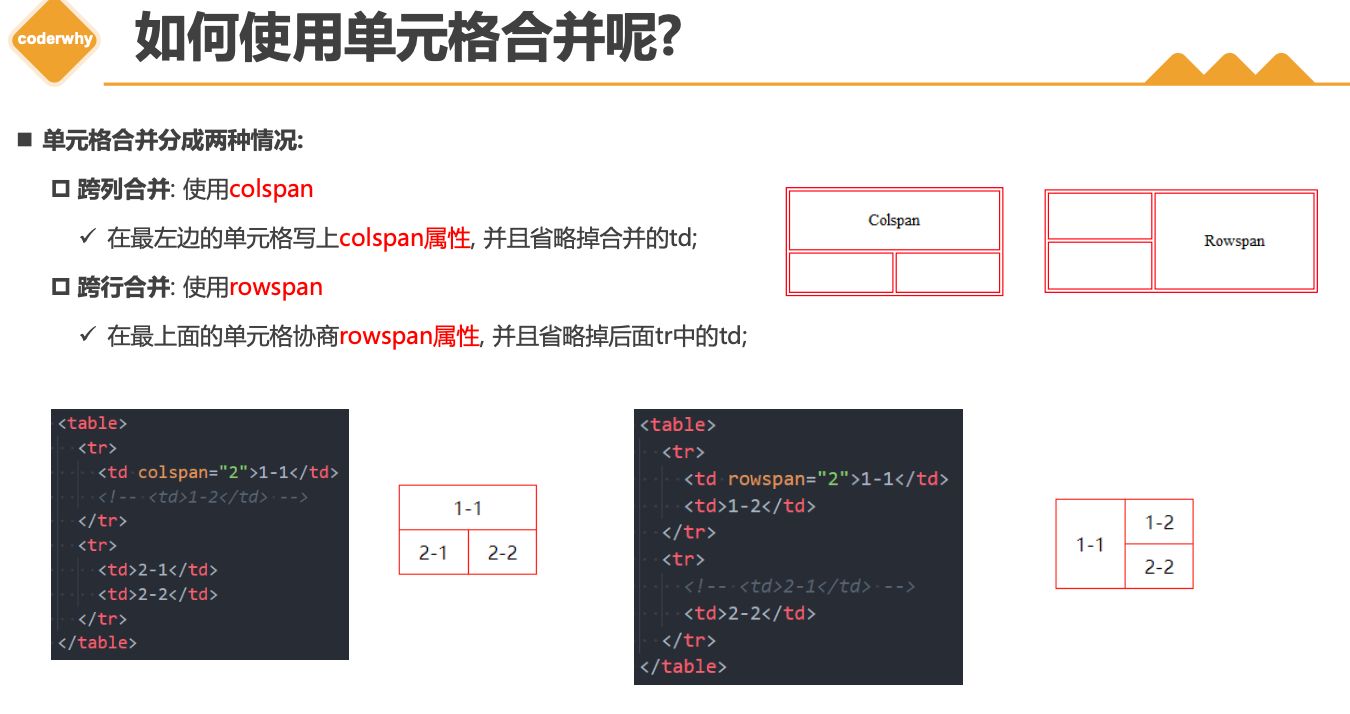
如何使用单元格合并呢?
- 单元格合并分成两种情况:
- 跨列合并: 使用
colspan- ✓ 在最左边的单元格写上
colspan属性, 并且省略掉合并的td;
- ✓ 在最左边的单元格写上
- 跨行合并: 使用
rowspan- ✓ 在最上面的单元格协商
rowspan属性, 并且省略掉后面tr中的td;
- ✓ 在最上面的单元格协商
2.5. 作业
三. 表单元素
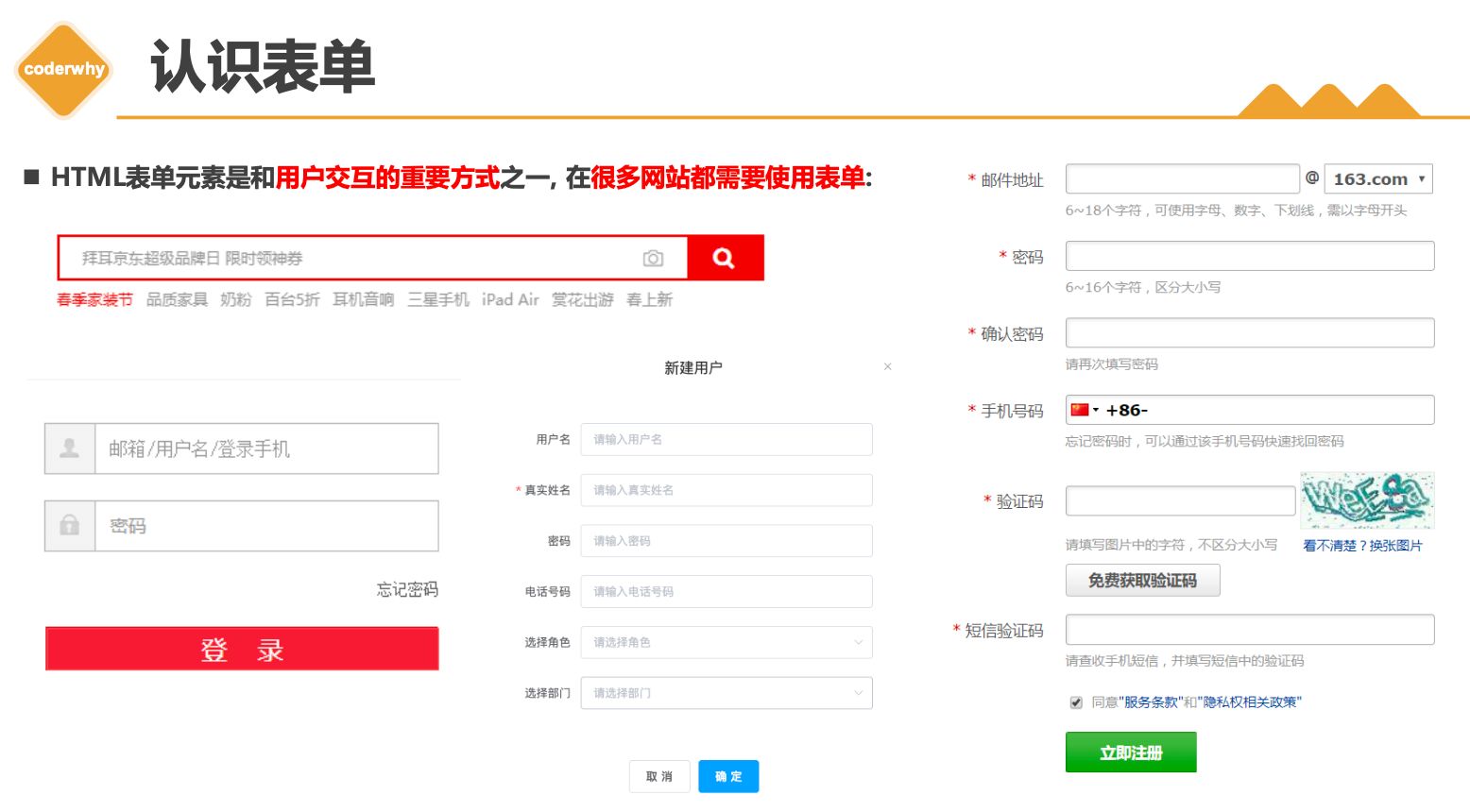
3.1. 常见表单
| * input | |
| * form | |
| * label | |
| * select/option | |
| * textarea |
form- 表单, 一般情况下,其他表单相关元素都是它的后代元素
input- 单行文本输入框、单选框、复选框、按钮等元素
textarea- 多行文本框
select、option- 下拉选择框
button- 按钮
label- 表单元素的标题
3.2. input元素
- type
- text
- password
- time
- date
- disabled/autofoucs/readonly
- MDN文档
- boolean属性写法
input元素的使用
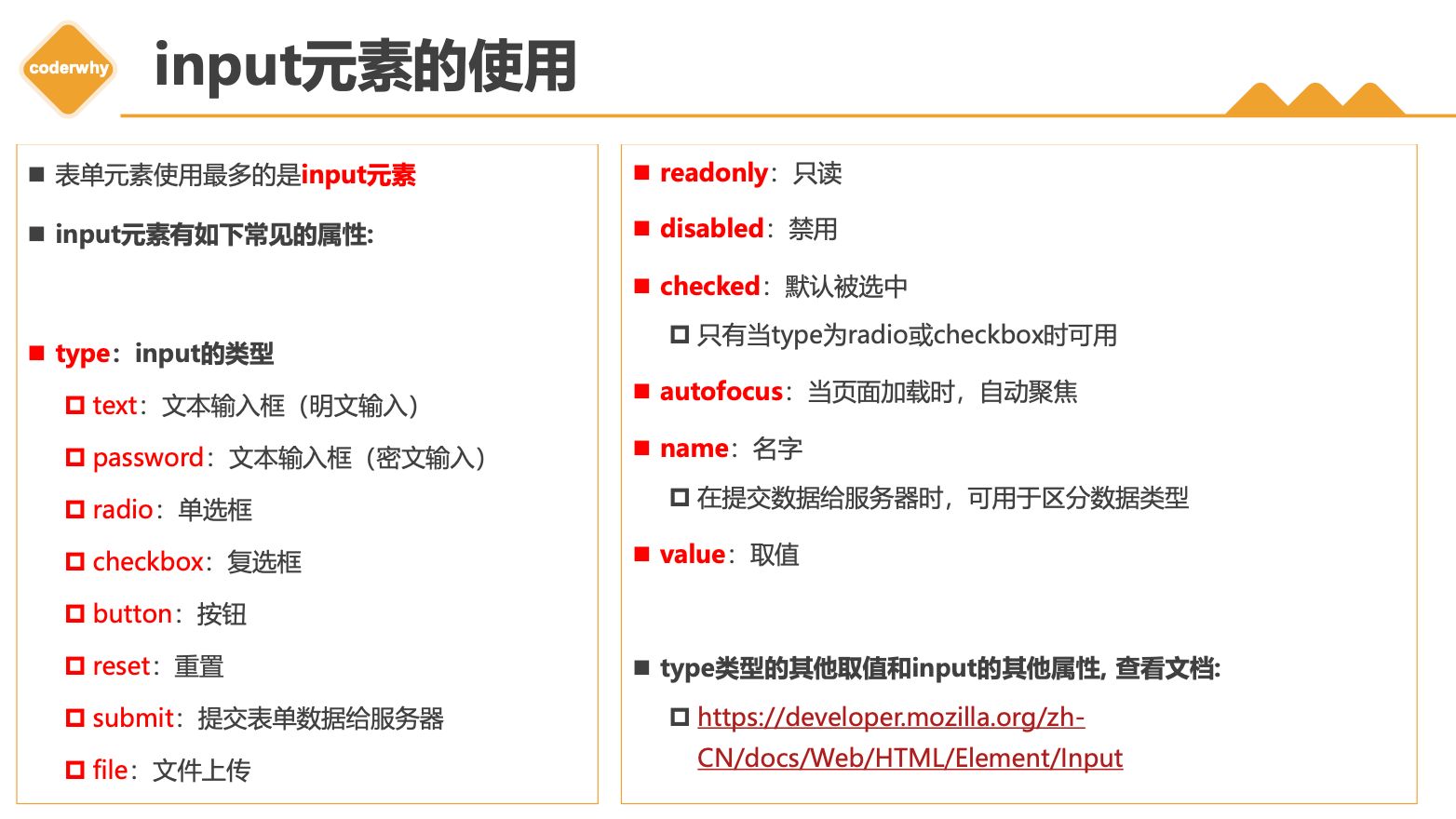
- 表单元素使用最多的是
input元素 input元素有如下常见的属性:type:input的类型text:文本输入框(明文输入)password:文本输入框(密文输入)radio:单选框checkbox:复选框button:按钮reset:重置submit:提交表单数据给服务器file:文件上传
readonly:只读disabled:禁用checked:默认被选中- 只有当
type为radio或checkbox时可用
- 只有当
autofocus:当页面加载时,自动聚焦name:名字- 在提交数据给服务器时,可用于区分数据类型
value:取值type类型的其他取值和input的其他属性, 查看文档:- https://developer.mozilla.org/zh-CN/docs/Web/HTML/Element/Input
布尔属性(boolean attributes)
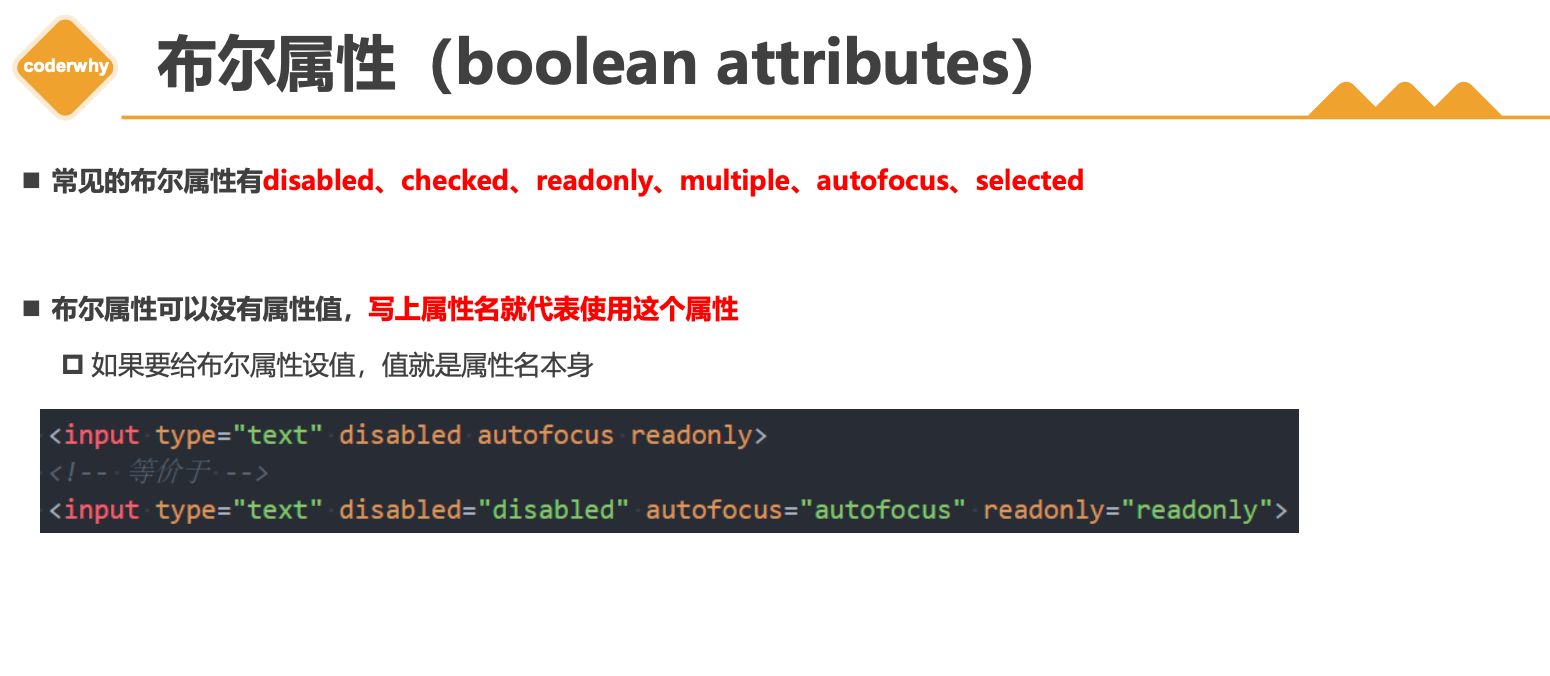
- 常见的布尔属性有
disabled、checked、readonly、multiple、autofocus、selected - 布尔属性可以没有属性值,写上属性名就代表使用这个属性
- 如果要给布尔属性设值,值就是属性名本身
3.3. input模拟按钮
| * 三种按钮 | |
| * 普通 | |
| * 重置 | |
| * 提交 | |
| * button |
表单可以实现按钮效果:
普通按钮(
type=button):使用value属性设置按钮文字重置按钮(
type=reset):重置它所属form的所有表单元素(包括input、textarea、select)提交按钮(
type=submit):提交它所属form的表单数据给服务器(包括input、textarea、select)

- 我们也可以通过按钮来实现:

3.4. input和label结合
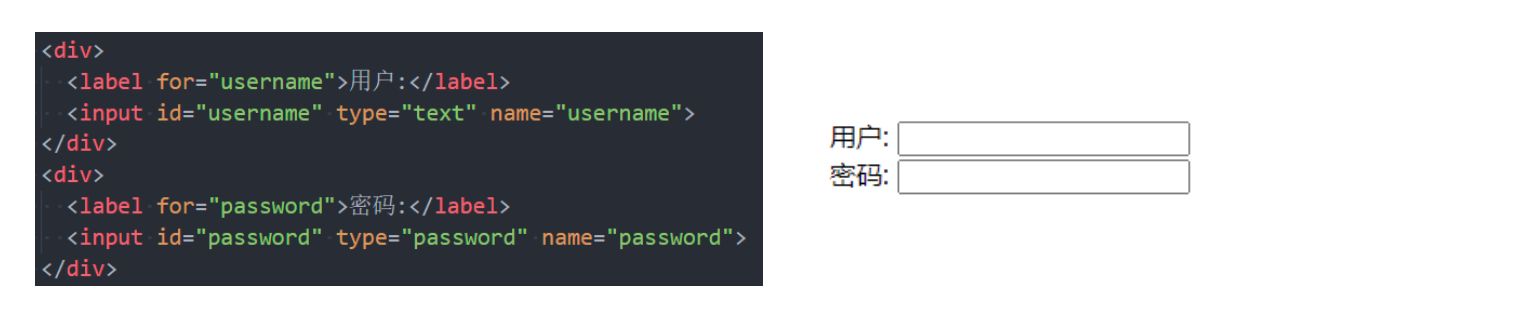
label元素一般跟input配合使用,用来表示input的标题labe可以跟某个input绑定,点击label就可以激活对应的input变成选中
3.5. radio/checkbox
| * name | |
| * value |
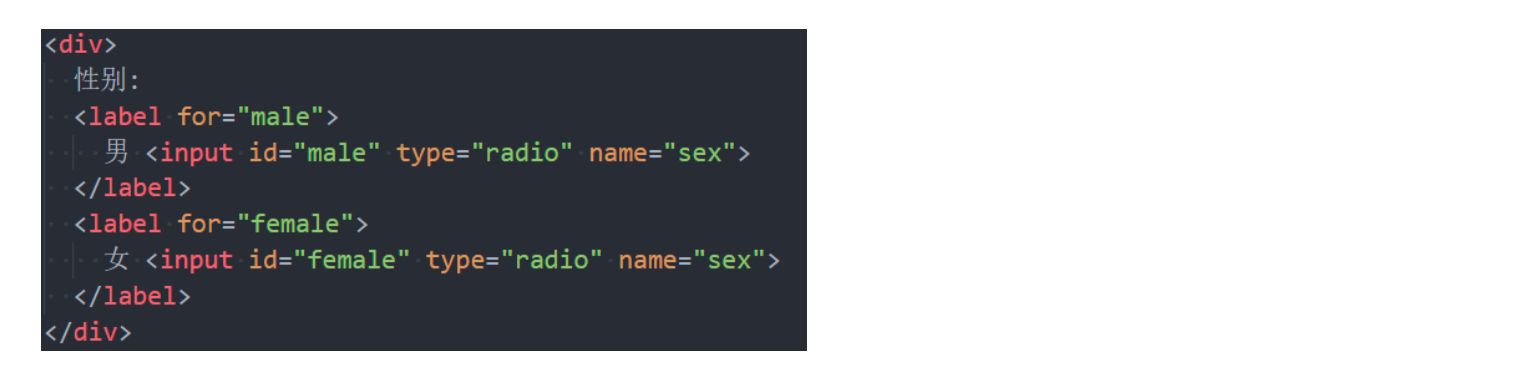
radio的使用
- 我们可以将
type类型设置为radio变成 单选框:name值相同的radio才具备单选功能
checkbox的使用
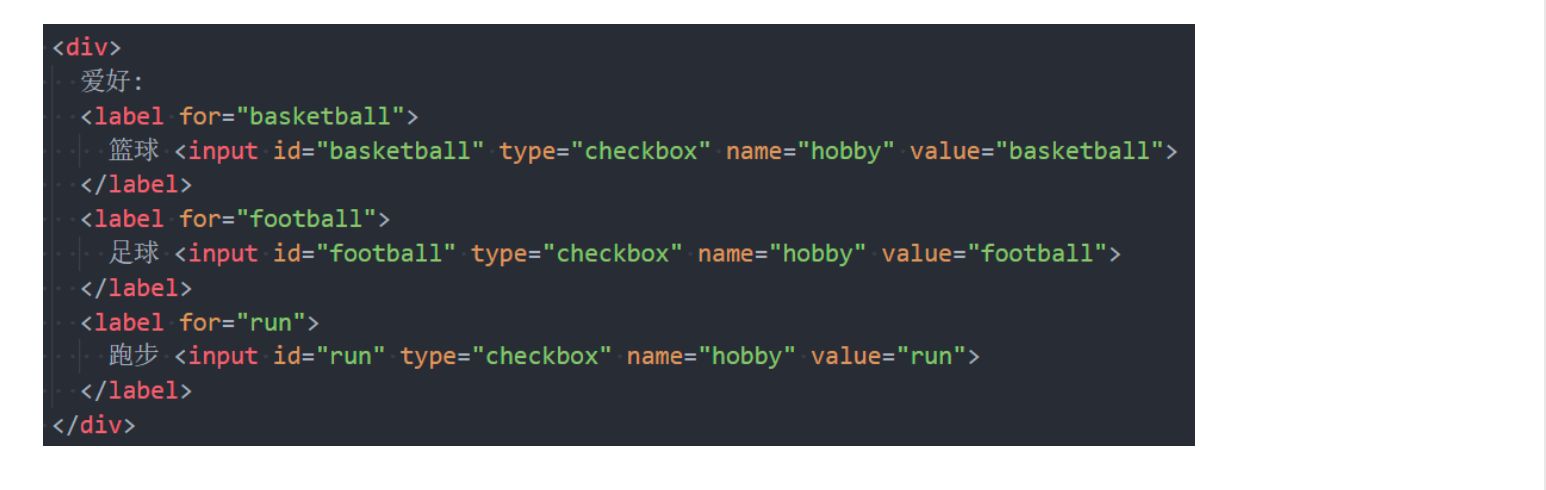
- 我们可以将
type类型设置为checkbox变成多选框:- 属于
同一种类型的checkbox,name值要保持一致
- 属于
3.6. textarea/select/option
textarea的使用
textarea的常用属性:cols:列数rows:行数
- 缩放的CSS设置
- 禁止缩放:
resize: none; - 水平缩放:
resize: horizontal; - 垂直缩放:
resize: vertical; - 水平垂直缩放:
resize: both;
- 禁止缩放:
select和option的使用
option是select的子元素,一个option代表一个选项select常用属性multiple:可以多选size:显示多少项
option常用属性selected:默认被选中
3.7. form表单
| * action 服务器地址 | |
| * method | |
| * get/post | |
| * target | |
| * 模拟百度一下 |
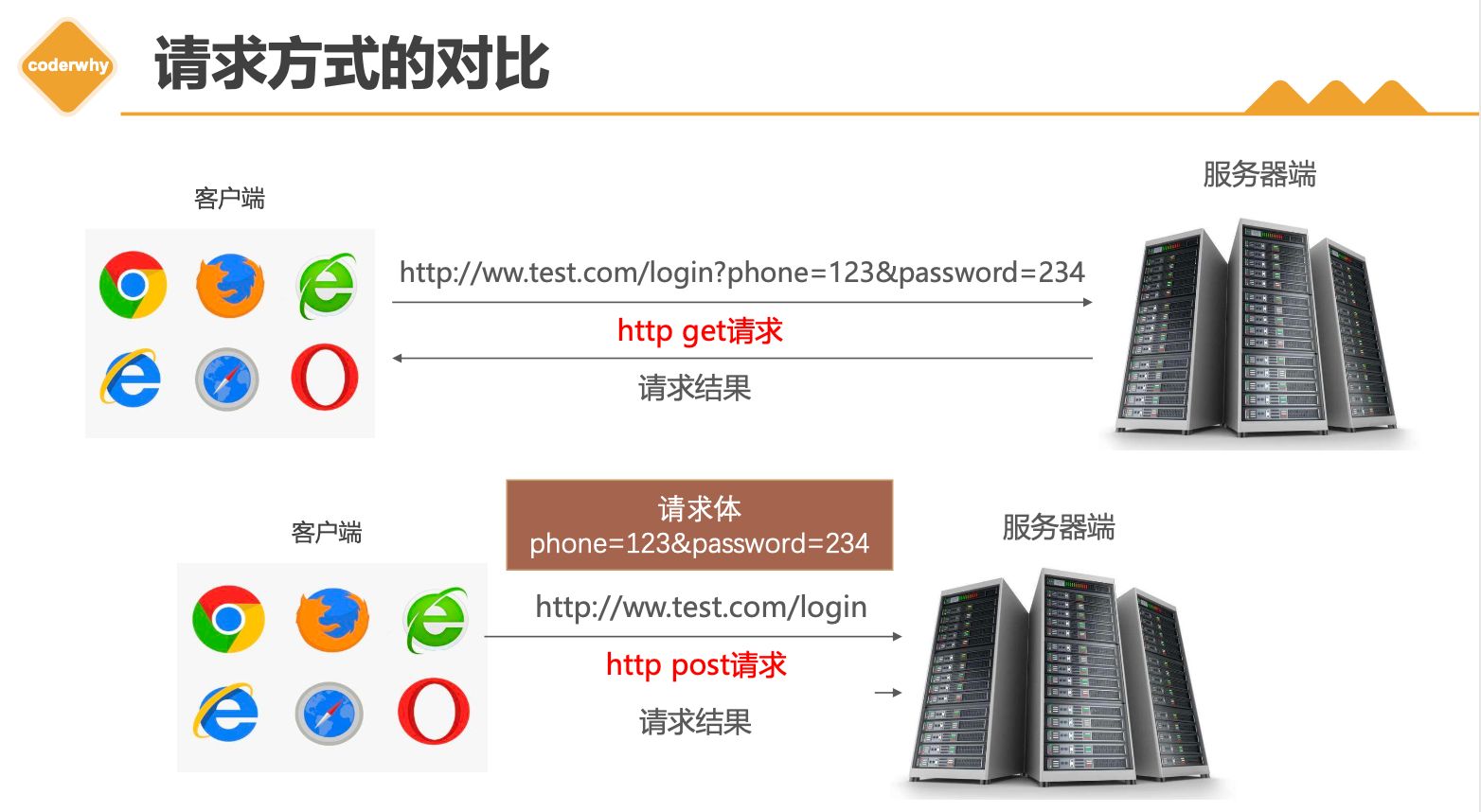
form通常作为表单元素的父元素:form可以将整个表单作为一个整体来进行操作;- 比如对整个表单进行重置;
- 比如对整个表单的数据进行提交;
form常见的属性如下:action- 用于
提交表单数据的请求URL
- 用于
method- 请求方法(
get和post),默认是get
- 请求方法(
target- 在什么地方打开URL(参考
a元素的target)
- 在什么地方打开URL(参考
请求方式的对比
四. Emmet
| 了解, 用到的时候知道可以这么写, 提高一点效率即可 |
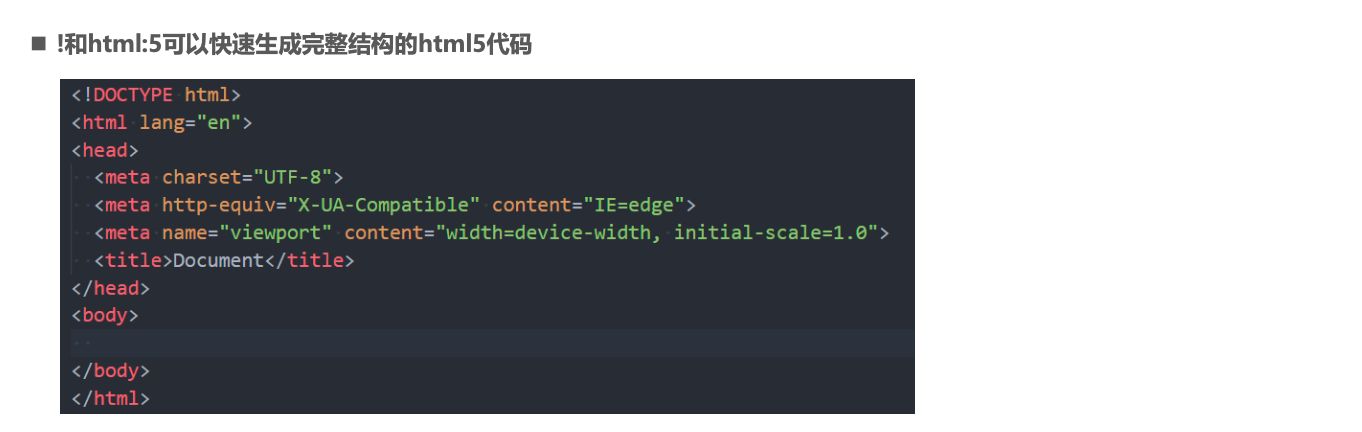
Emmet(前身为Zen Coding) 是一个能大幅度提高前端开发效率的一个工具.- 在前端开发的过程中,一大部分的工作是写
HTML、CSS代码, 如果手动来编写效果会非常低. VsCode内置了Emmet语法,在后缀为.html/.css中输入缩写后按Tab/Enter键即会自动生成相应代码
- 在前端开发的过程中,一大部分的工作是写
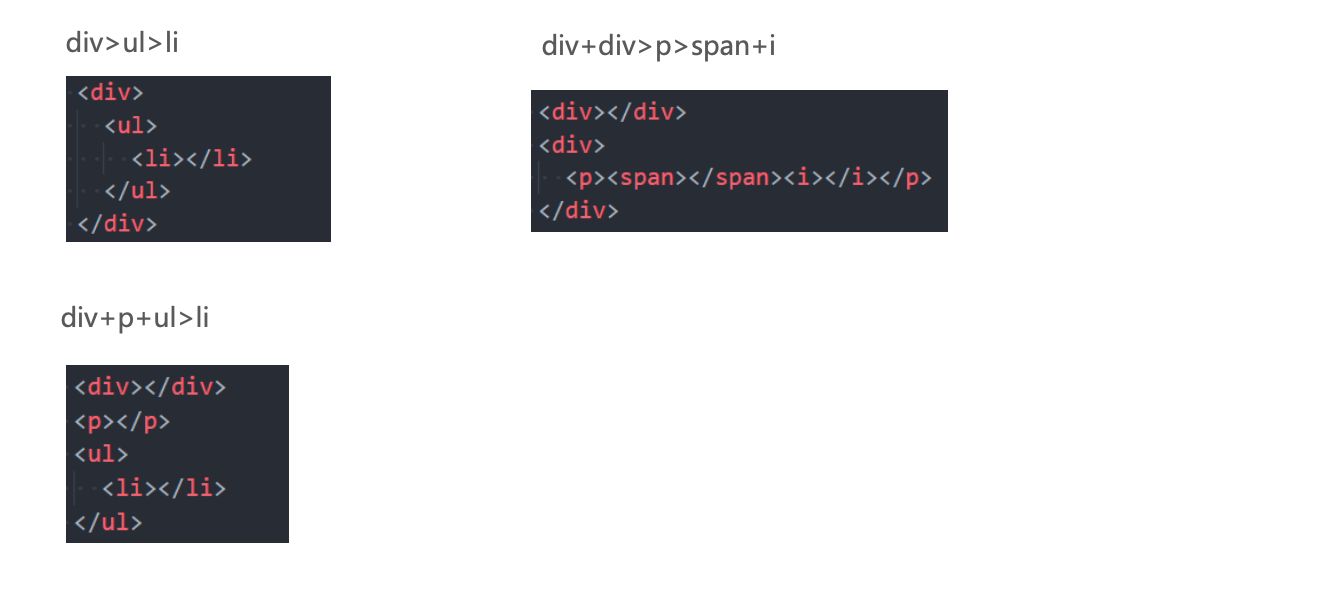
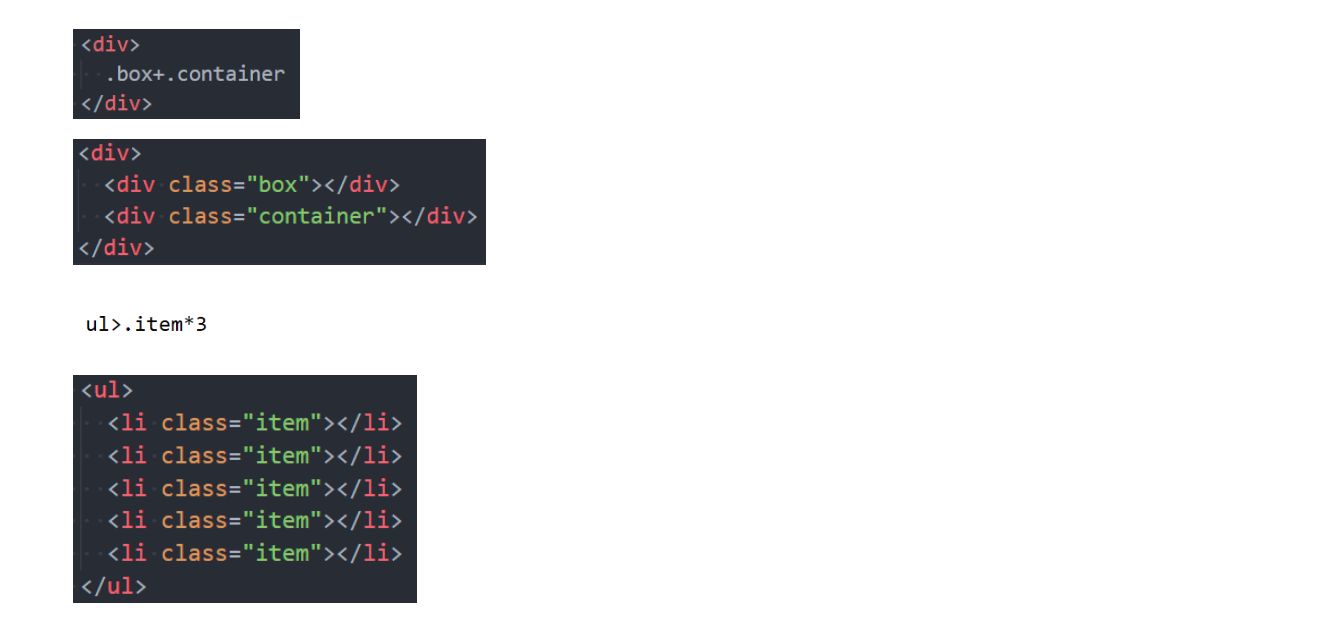
> (子代)和 + (兄弟)
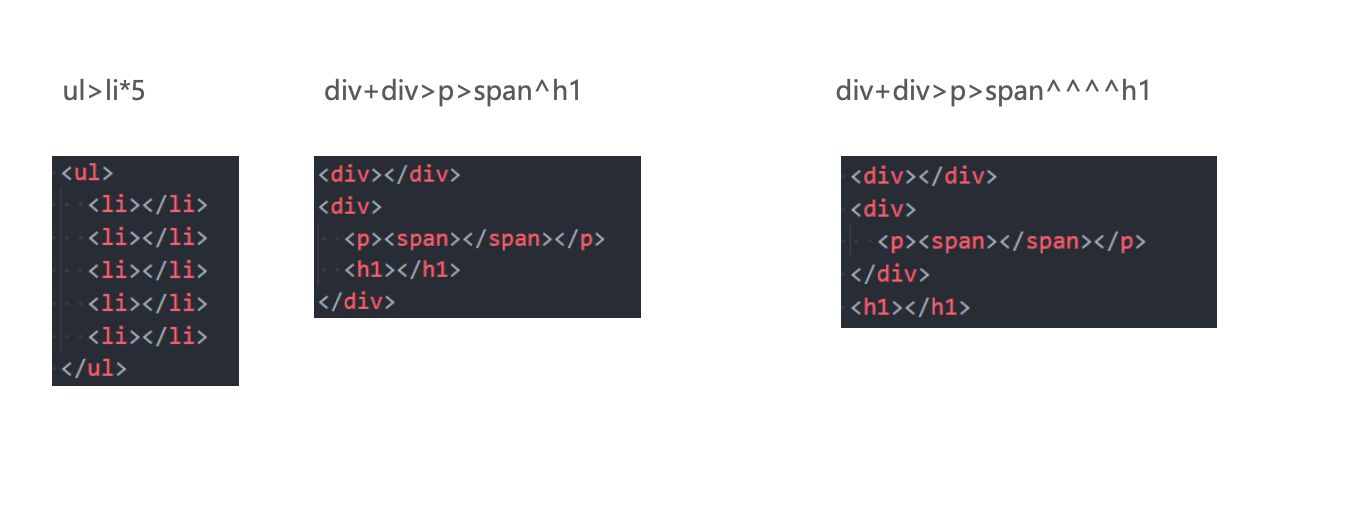
* (多个)和 ^ (上一级)
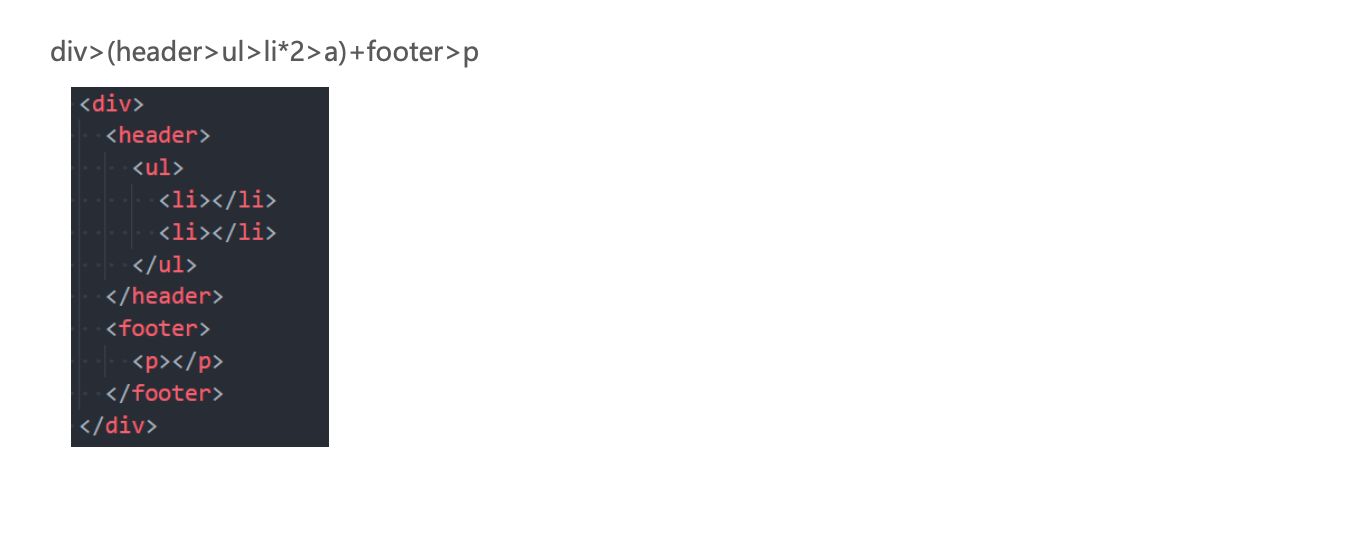
()(分组)
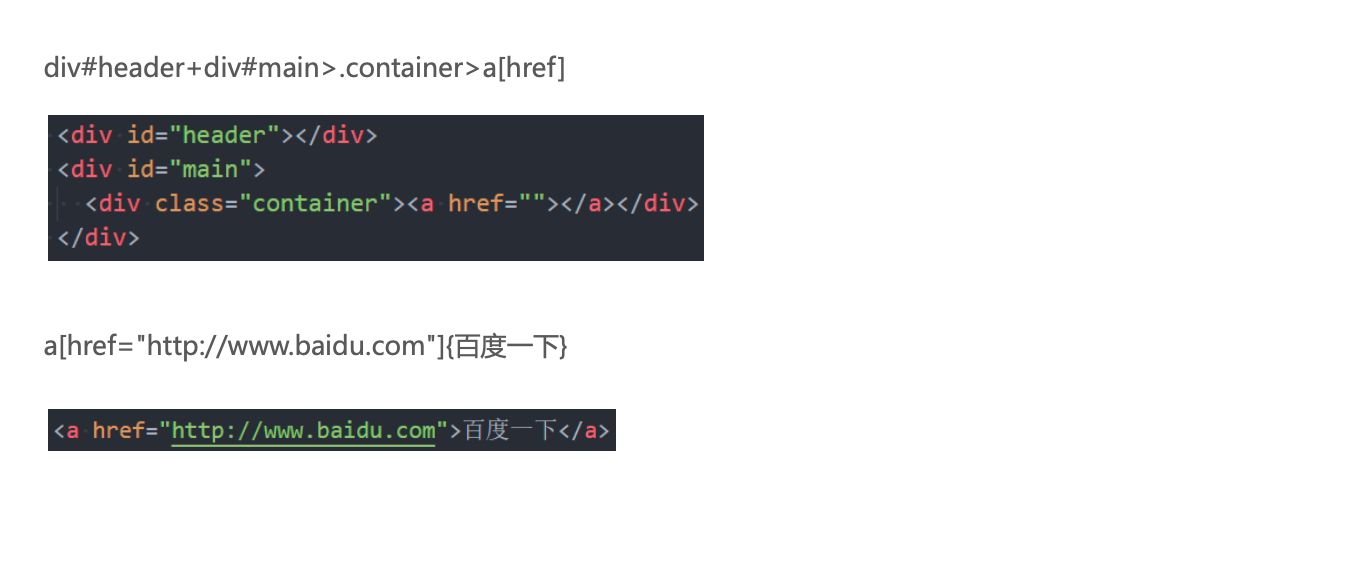
属性(id属性、class属性、普通属性) {}(内容)
$(数字)
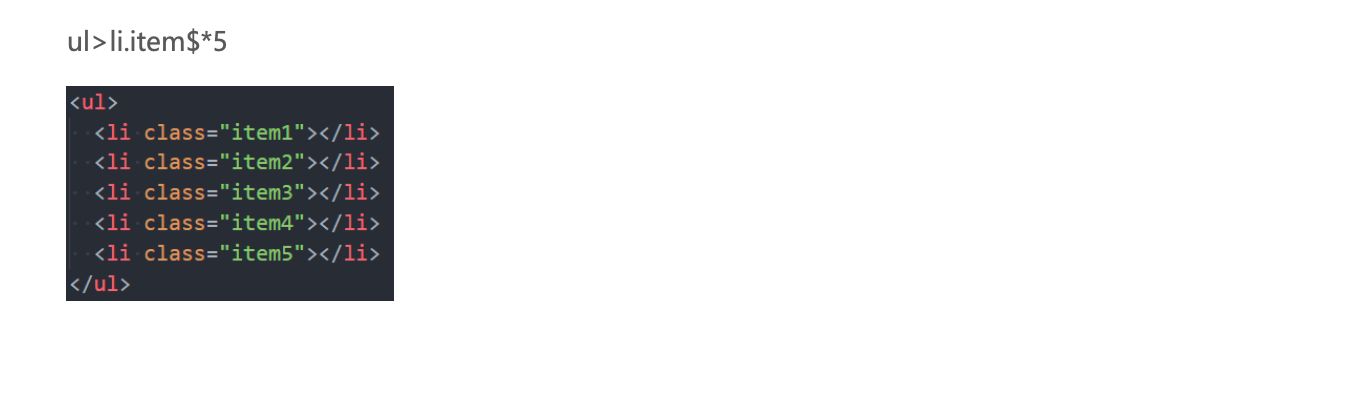
隐式标签
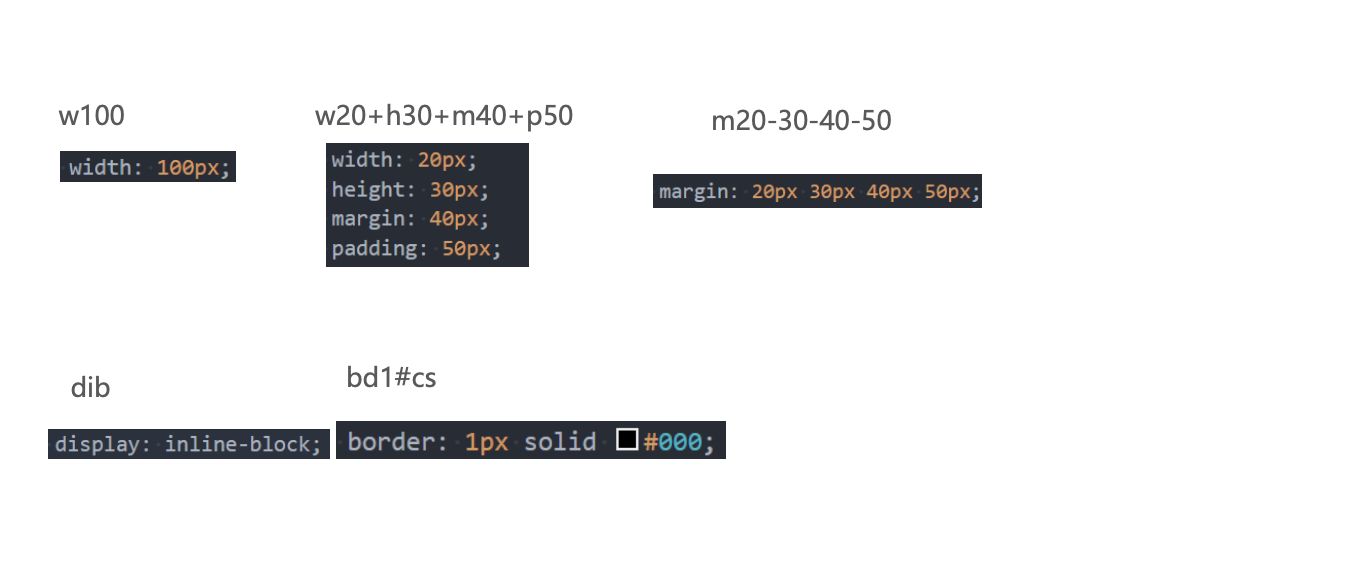
CSS Emmet
结构伪类 - :nth-child
:nth-child(1)- 是
父元素中的第1个子元素
- 是
:nth-child(2n)n代表任意正整数和0- 是父元素中的第偶数个子元素(第
2、4、6、8……个) - 跟
:nth-child(even)同义
:nth-child(2n + 1)n代表任意正整数和0- 是父元素中的第奇数个子元素(第
1、3、5、7……个) - 跟
:nth-child(odd)同义
nth-child(-n + 2)- 代表前2个子元素
结构伪类 - :nth-last-child( )
:nth-last-child()的语法跟:nth-child()类似,不同点是:nth-last-child()从最后一个子元素开始往前计数:nth-last-child(1),代表倒数第一个子元素:nth-last-child(-n + 2),代表最后2个子元素
:nth-of-type()用法跟:nth-child()类似- 不同点是
:nth-of-type()计数时只计算同种类型的元素
- 不同点是
:nth-last-of-type()用法跟:nth-of-type()类似- 不同点是
:nth-last-of-type()从最后一个这种类型的子元素开始往前计数
- 不同点是
结构伪类 - :nth-of-type( )、:nth-last-of-type( )
- 其他常见的伪类(了解):
:first-child,等同于:nth-child(1):last-child,等同于:nth-last-child(1):first-of-type,等同于:nth-of-type(1):last-of-type,等同于:nth-last-of-type(1):only-child,是父元素中唯一的子元素:only-of-type,是父元素中唯一的这种类型的子元素
- 下面的伪类偶尔会使用:
:root,根元素,就是HTML元素:empty代表里面完全空白的元素
否定伪类(negation pseudo-class)
:not()的格式是:not(x)x是一个简单选择器元素选择器、通用选择器、属性选择器、类选择器、id选择器、伪类(除否定伪类)
:not(x)表示 除x以外的元素