
前言
提到监控,大家想到的大概是 UptimeRobot ,个人免费 50 个站点,而且监控页面也很炫酷
但是有个缺点就是似乎定制域名的功能要付费?
试过把站点扒下来,但是好像有 CORS 的跨域问题((((
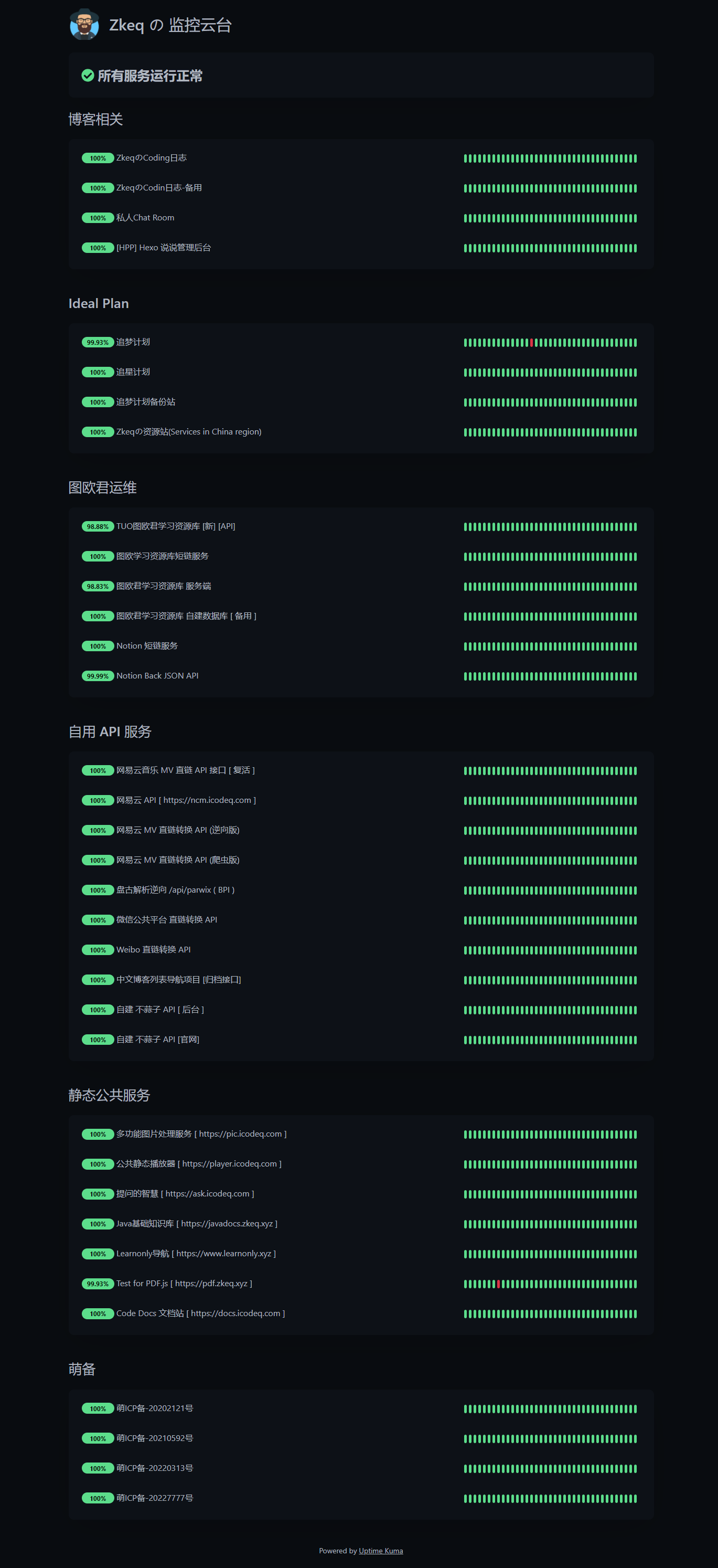
最近几天,朋友那里发现了一款替代品,这页面感觉比 UptimeRobot 还炫酷 *
见图 👀
后台也十分好看 ~
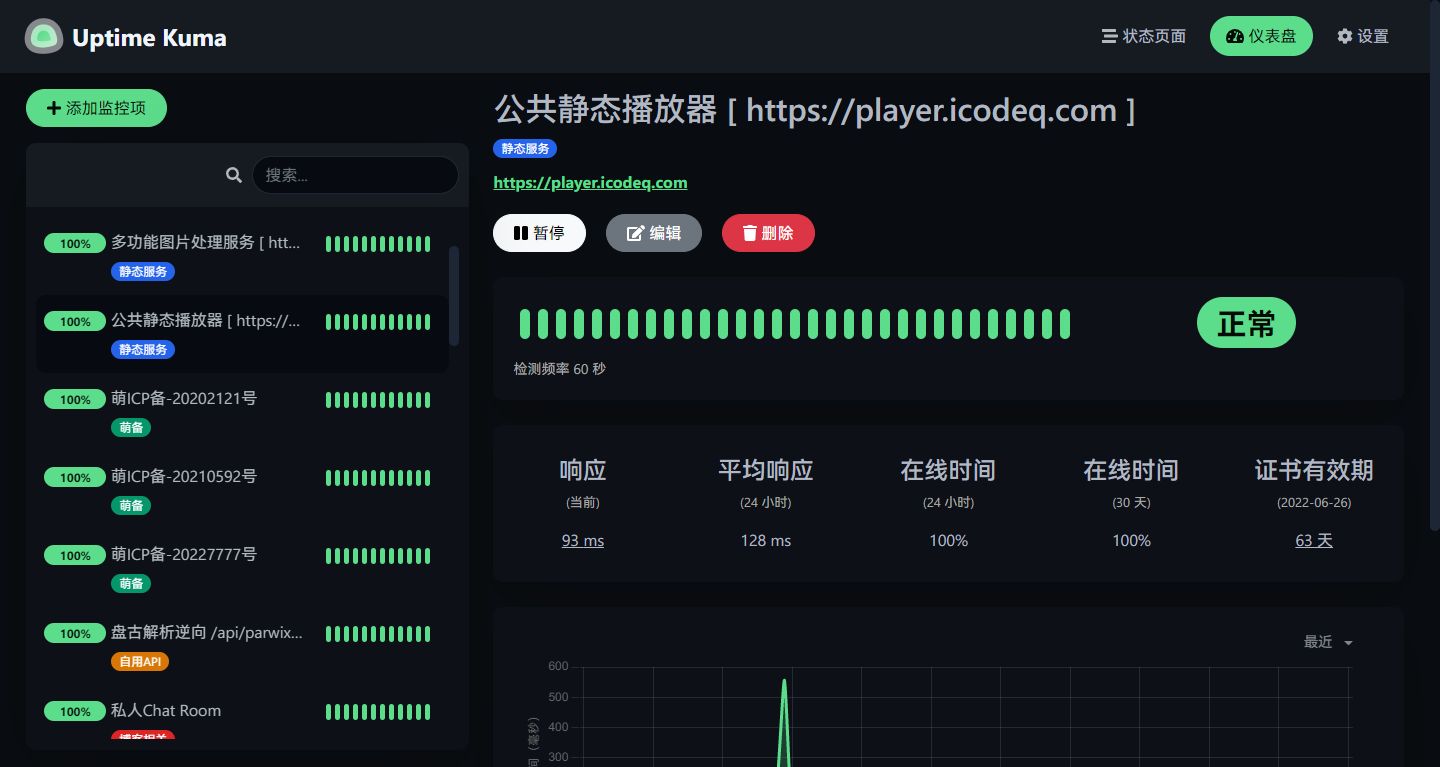
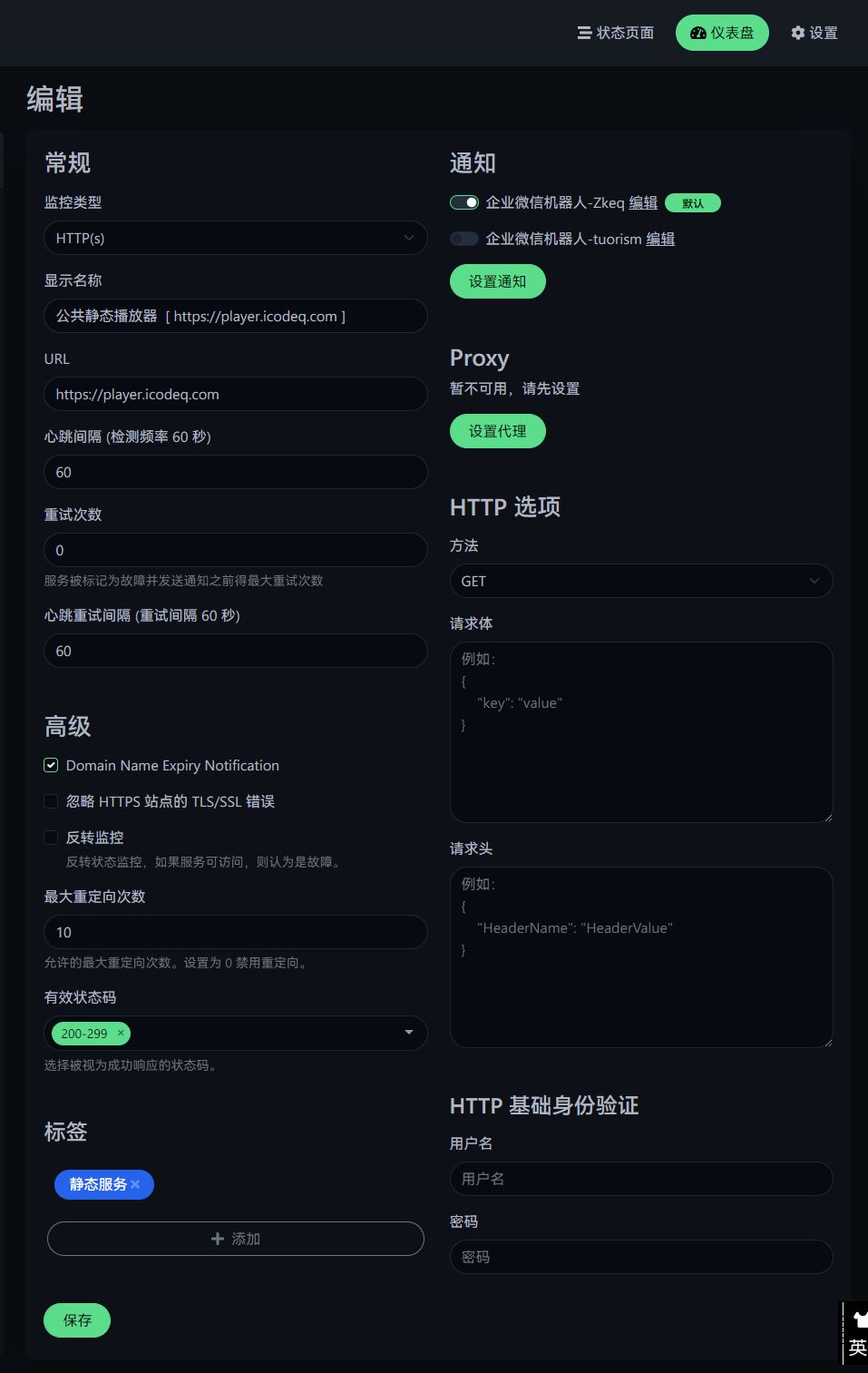
详情页面
并且还实现了微信推送的功能
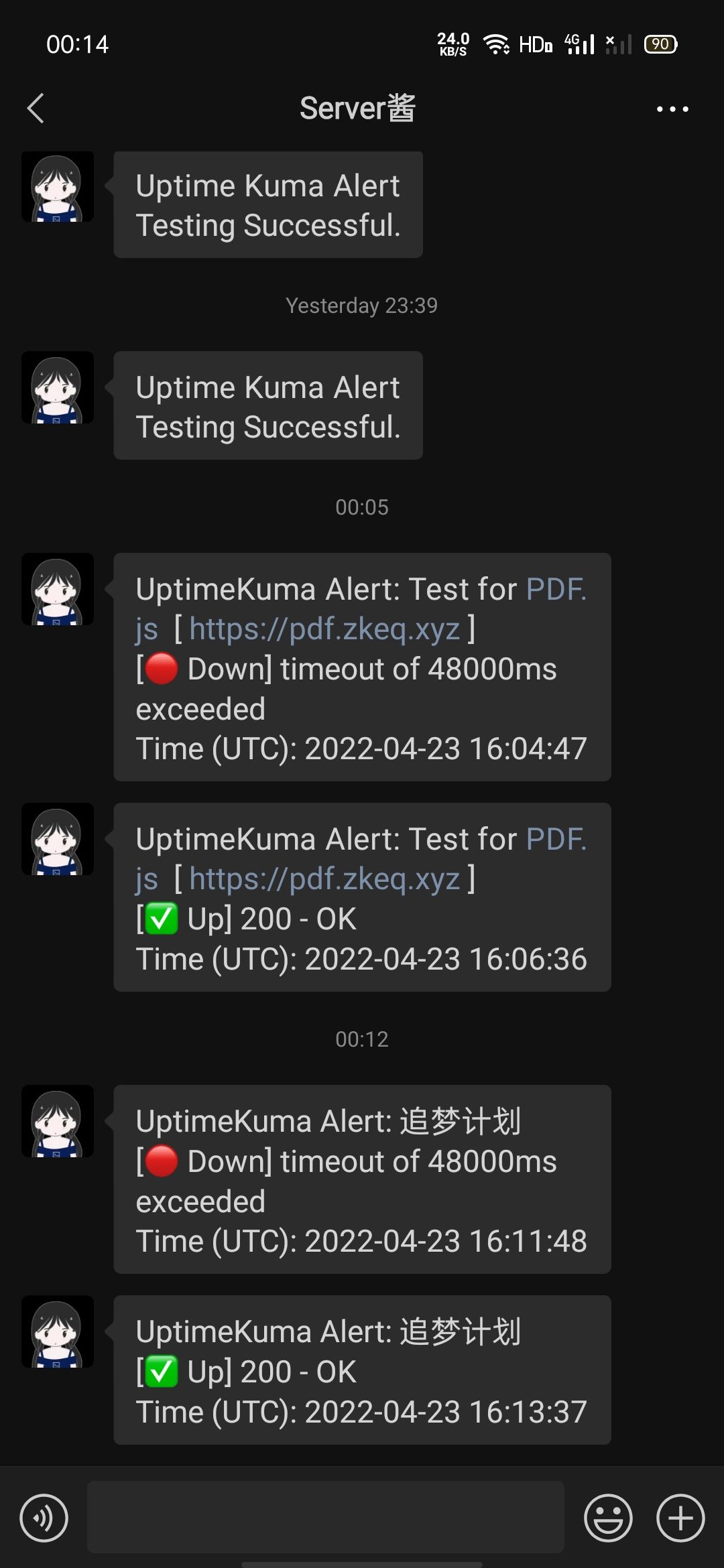
实现步骤
搭建部分
项目地址
Replit推荐部署仓库:https://github.com/valetzx/uptimekumaonreplit
直接跟教程搭建即可,重点讲一下怎么把推送发到 【正常微信】。
内置一个企业微信通道,但是正常人谁用那玩意啊))))
这里用到的一个项目是方糖的开源版(因为我穷,学生嘛,理解一下))
https://github.com/easychen/wecomchan
easychen/wecomchan: 通过企业微信向微信推送消息的配置文档、直推函数和可自行搭建的在线服务代码。可以看成Server酱的开源替代方案之一。
其实这个项目里面的 README.md 写的已经很清楚了,甚至连用法都有……
| PYTHON版: | |
| def send_to_wecom(text,wecom_cid,wecom_aid,wecom_secret,wecom_touid='@all'): | |
| return response | |
| else: | |
| return False | |
| def send_to_wecom_image(base64_content,wecom_cid,wecom_aid,wecom_secret,wecom_touid='@all'): | |
| return response | |
| else: | |
| return False | |
| def send_to_wecom_markdown(text,wecom_cid,wecom_aid,wecom_secret,wecom_touid='@all'): | |
| return response | |
| else: | |
| return False | |
| 使用实例: | |
| ret = send_to_wecom("推送测试\r\n测试换行", "企业ID③", "应用ID①", "应用secret②"); | |
| print(ret) | |
| ret = send_to_wecom('<a href="https://www.github.com/">文本中支持超链接</a>', "企业ID③", "应用ID①", "应用secret②"); | |
| print(ret) | |
| ret = send_to_wecom_image("此处填写图片Base64", "企业ID③", "应用ID①", "应用secret②"); | |
| print(ret) | |
| ret = send_to_wecom_markdown("**Markdown 内容**", "企业ID③", "应用ID①", "应用secret②"); | |
| print(ret) |
那么感觉也没啥讲的,直接讲怎么搭建实现吧。
首先去按教程
配置好自己的企业微信,那么我们可以拿到这么几个字段
| wecom_cid = "wwXXXXXXXXXXXXXXX" | |
| wecom_aid = "1000XXX" | |
| wecom_secret = "XXXXXXXXXXXX-XXXXXXXXXXX-XXXXXXXXXXXXXXXX" |
就这三个字段就够了
然后去写一下 FastAPI 的配置
这个经过我加工了一下….支持了 redis 缓存,需要
Redis环境loguru记录日志subprocess用于启动RedisFastAPI主要框架uvicornFast API 启动器)不过,我推荐使用
Replit直接部署,把以下文件直接复制粘贴进去,点RUN就行了()(不行的话来评论区
.\main.py
| import base64 | |
| import json | |
| import requests | |
| import uvicorn | |
| import redis | |
| import logger as lg | |
| from fastapi import FastAPI, Form | |
| import subprocess | |
| start_redis = "redis-server redis.conf" | |
| r = redis.Redis(host='localhost', port=6379, db=0) | |
| # 如果你用的个人版,请将以下填入环境变量中 | |
| # 并取消注释以下代码 | |
| # import os | |
| # my_secret = os.environ['wecom_cid'] | |
| # wecom_aid = os.environ['wecom_aid'] | |
| # wecom_secret = os.environ['wecom_secret'] | |
| wecom_cid = "wwXXXXXXXXXXXXXXX" | |
| wecom_aid = "1000XXX" | |
| wecom_secret = "XXXXXXXXXXXX-XXXXXXXXXXX-XXXXXXXXXXXXXXXX" | |
| app = FastAPI() | |
| def get_token(): | |
| global wecom_cid, wecom_aid, wecom_secret | |
| access_token = r.get('token') | |
| if not access_token: | |
| lg.logger_info('Redis access_token is empty, get from wecom') | |
| get_token_url = f"https://qyapi.weixin.qq.com/cgi-bin/gettoken?corpid={wecom_cid}&corpsecret={wecom_secret}" | |
| lg.logger_info('get_token_url: ' + get_token_url) | |
| response = requests.get(get_token_url).content | |
| lg.logger_info('response: ' + str(response)) | |
| access_token = json.loads(response).get('access_token') | |
| lg.logger_success('access_token: ' + str(access_token)) | |
| r.set('token', access_token, ex=7000) | |
| else: | |
| access_token = access_token.decode('utf-8') | |
| lg.logger_success(f"从Redis 中拿到 access_token") | |
| return access_token | |
| def send_to_wecom(text, wecom_touid='@all'): | |
| access_token = get_token() | |
| lg.logger_success("message: " + str(text)) | |
| if access_token and len(access_token) > 0: | |
| send_msg_url = f'https://qyapi.weixin.qq.com/cgi-bin/message/send?access_token={access_token}' | |
| data = { | |
| "touser": wecom_touid, | |
| "agentid": wecom_aid, | |
| "msgtype": "text", | |
| "text": { | |
| "content": text | |
| }, | |
| "duplicate_check_interval": 600 | |
| } | |
| response = requests.post(send_msg_url, data=json.dumps(data)).content | |
| lg.logger_info("response: " + str(response)) | |
| return response | |
| else: | |
| return False | |
| def send_to_wecom_image(base64_content, wecom_touid='@all'): | |
| access_token = get_token() | |
| lg.logger_info('access_token: ' + str(access_token)) | |
| if access_token and len(access_token) > 0: | |
| upload_url = f'https://qyapi.weixin.qq.com/cgi-bin/media/upload?access_token={access_token}&type=image' | |
| upload_response = requests.post(upload_url, files={ | |
| "picture": base64.b64decode(base64_content) | |
| }).json() | |
| if "media_id" in upload_response: | |
| media_id = upload_response['media_id'] | |
| else: | |
| return False | |
| send_msg_url = f'https://qyapi.weixin.qq.com/cgi-bin/message/send?access_token={access_token}' | |
| data = { | |
| "touser": wecom_touid, | |
| "agentid": wecom_aid, | |
| "msgtype": "image", | |
| "image": { | |
| "media_id": media_id | |
| }, | |
| "duplicate_check_interval": 600 | |
| } | |
| response = requests.post(send_msg_url, data=json.dumps(data)).content | |
| lg.logger_success("response: " + str(response)) | |
| return response | |
| else: | |
| return False | |
| def send_to_wecom_markdown(text, wecom_touid='@all'): | |
| access_token = get_token() | |
| if access_token and len(access_token) > 0: | |
| send_msg_url = f'https://qyapi.weixin.qq.com/cgi-bin/message/send?access_token={access_token}' | |
| data = { | |
| "touser": wecom_touid, | |
| "agentid": wecom_aid, | |
| "msgtype": "markdown", | |
| "markdown": { | |
| "content": text | |
| }, | |
| "duplicate_check_interval": 600 | |
| } | |
| lg.logger_success("message: " + str(text)) | |
| response = requests.post(send_msg_url, data=json.dumps(data)).content | |
| lg.logger_success("response: " + str(response)) | |
| return response | |
| else: | |
| return False | |
| def main(type: str = Form(...), title: str = Form(...), body: str = Form(...), wecom_touid: str = Form(...)): | |
| if type == 'note': | |
| lg.logger_info(f'收到笔记消息:{title}') | |
| data = send_to_wecom(title + '\n' + body, wecom_touid) | |
| elif type == 'image': | |
| lg.logger_info(f'收到图片消息:{title}') | |
| data = send_to_wecom_image(body, wecom_touid) | |
| elif type == 'markdown': | |
| lg.logger_info(f'收到markdown消息:{title}') | |
| data = send_to_wecom_markdown(title + '\n' + body, wecom_touid) | |
| else: | |
| data = send_to_wecom(title + '\n' + body, wecom_touid) | |
| return data | |
| def get(): | |
| return {"msg": "好耶,部署成功了!但是值得注意的是请不要将此地址告诉别人((防止微信消息被刷爆"} | |
| def head(): | |
| return {"msg": "好耶,部署成功了!但是值得注意的是请不要将此地址告诉别人((防止微信消息被刷爆"} | |
| if __name__ == "__main__": | |
| print("start redis") | |
| subprocess.Popen(start_redis, shell=True) | |
| uvicorn.run("main:app", host="0.0.0.0", port=8080, log_level="info") | |
日志功能
.\logger.py
| # coding:utf-8 | |
| from loguru import logger | |
| logger.add("./log/file_{time}.log", rotation="20 MB") | |
| def logger_error(msg): | |
| logger.error(msg) | |
| def logger_warning(msg): | |
| logger.warning(msg) | |
| def logger_debug(msg): | |
| logger.debug(msg) | |
| def logger_exception(msg): | |
| logger.exception(msg) | |
| def logger_critical(msg): | |
| logger.critical(msg) | |
| def logger_success(msg): | |
| logger.success(msg) | |
| def logger_info(msg): | |
| logger.info(msg) | |
| def logger_trace(msg): | |
| logger.trace(msg) | |
.\redis.conf
| bind 127.0.0.1 -::1 | |
| protected-mode yes | |
| port 6379 | |
| tcp-backlog 511 | |
| timeout 0 | |
| tcp-keepalive 300 | |
| daemonize no | |
| pidfile /var/run/redis_6379.pid | |
| loglevel notice | |
| logfile "" | |
| databases 16 | |
| always-show-logo no | |
| set-proc-title yes | |
| proc-title-template "{title} {listen-addr} {server-mode}" | |
| stop-writes-on-bgsave-error yes | |
| rdbcompression yes | |
| rdbchecksum yes | |
| dbfilename dump.rdb | |
| rdb-del-sync-files no | |
| dir ./ | |
| replica-serve-stale-data yes | |
| replica-read-only yes | |
| repl-diskless-sync no | |
| repl-diskless-sync-delay 5 | |
| repl-diskless-load disabled | |
| repl-disable-tcp-nodelay no | |
| replica-priority 100 | |
| acllog-max-len 128 | |
| lazyfree-lazy-eviction no | |
| lazyfree-lazy-expire no | |
| lazyfree-lazy-server-del no | |
| replica-lazy-flush no | |
| lazyfree-lazy-user-del no | |
| lazyfree-lazy-user-flush no | |
| oom-score-adj no | |
| oom-score-adj-values 0 200 800 | |
| disable-thp yes | |
| appendonly no | |
| appendfilename "appendonly.aof" | |
| appendfsync everysec | |
| no-appendfsync-on-rewrite no | |
| auto-aof-rewrite-percentage 100 | |
| auto-aof-rewrite-min-size 64mb | |
| aof-load-truncated yes | |
| aof-use-rdb-preamble yes | |
| lua-time-limit 5000 | |
| slowlog-log-slower-than 10000 | |
| slowlog-max-len 128 | |
| latency-monitor-threshold 0 | |
| notify-keyspace-events "" | |
| hash-max-ziplist-entries 512 | |
| hash-max-ziplist-value 64 | |
| list-max-ziplist-size -2 | |
| list-compress-depth 0 | |
| set-max-intset-entries 512 | |
| zset-max-ziplist-entries 128 | |
| zset-max-ziplist-value 64 | |
| hll-sparse-max-bytes 3000 | |
| stream-node-max-bytes 4096 | |
| stream-node-max-entries 100 | |
| activerehashing yes | |
| client-output-buffer-limit normal 0 0 0 | |
| client-output-buffer-limit replica 256mb 64mb 60 | |
| client-output-buffer-limit pubsub 32mb 8mb 60 | |
| hz 10 | |
| dynamic-hz yes | |
| aof-rewrite-incremental-fsync yes | |
| rdb-save-incremental-fsync yes | |
| jemalloc-bg-thread yes |
.\replit.nix (若 使用的 Replit)
| { pkgs }: { | |
| deps = [ | |
| pkgs.python38Full | |
| pkgs.redis | |
| ]; | |
| env = { | |
| PYTHON_LD_LIBRARY_PATH = pkgs.lib.makeLibraryPath [ | |
| # Neded for pandas / numpy | |
| pkgs.stdenv.cc.cc.lib | |
| pkgs.zlib | |
| # Needed for pygame | |
| pkgs.glib | |
| # Needed for matplotlib | |
| pkgs.xorg.libX11 | |
| ]; | |
| PYTHONBIN = "${pkgs.python38Full}/bin/python3.8"; | |
| LANG = "en_US.UTF-8"; | |
| }; | |
| } |
.\.replit
| # The command that runs the program. | |
| run = ["python3", "main.py"] | |
| # The primary language of the repl. There can be others, though! | |
| language = "python3" | |
| # The main file, which will be shown by default in the editor. | |
| entrypoint = "main.py" | |
| # A list of globs that specify which files and directories should | |
| # be hidden in the workspace. | |
| hidden = ["venv", ".config", "**/__pycache__", "**/.mypy_cache", "**/*.pyc"] | |
| # Specifies which nix channel to use when building the environment. | |
| [nix] | |
| channel = "stable-21_11" | |
| # Per-language configuration: python3 | |
| [languages.python3] | |
| # Treats all files that end with `.py` as Python. | |
| pattern = "**/*.py" | |
| # Tells the workspace editor to syntax-highlight these files as | |
| # Python. | |
| syntax = "python" | |
| # The command needed to start the Language Server Protocol. For | |
| # linting and formatting. | |
| [languages.python3.languageServer] | |
| start = ["pyls"] | |
| # The command to start the interpreter. | |
| [interpreter] | |
| [interpreter.command] | |
| args = [ | |
| "stderred", | |
| "--", | |
| "prybar-python3", | |
| "-q", | |
| "--ps1", | |
| "\u0001\u001b[33m\u0002\u0001\u001b[00m\u0002 ", | |
| "-i", | |
| ] | |
| env = { LD_LIBRARY_PATH = "$PYTHON_LD_LIBRARY_PATH" } | |
| # The environment variables needed to correctly start Python and use the | |
| # package proxy. | |
| [env] | |
| VIRTUAL_ENV = "/home/runner/${REPL_SLUG}/venv" | |
| PATH = "${VIRTUAL_ENV}/bin" | |
| PYTHONPATH="${VIRTUAL_ENV}/lib/python3.8/site-packages" | |
| REPLIT_POETRY_PYPI_REPOSITORY="https://package-proxy.replit.com/pypi/" | |
| MPLBACKEND="TkAgg" | |
| # Enable unit tests. This is only supported for a few languages. | |
| [unitTest] | |
| language = "python3" | |
| # Add a debugger! | |
| [debugger] | |
| support = true | |
| # How to start the debugger. | |
| [debugger.interactive] | |
| transport = "localhost:0" | |
| startCommand = ["dap-python", "main.py"] | |
| # How to communicate with the debugger. | |
| [debugger.interactive.integratedAdapter] | |
| dapTcpAddress = "localhost:0" | |
| # How to tell the debugger to start a debugging session. | |
| [debugger.interactive.initializeMessage] | |
| command = "initialize" | |
| type = "request" | |
| [debugger.interactive.initializeMessage.arguments] | |
| adapterID = "debugpy" | |
| clientID = "replit" | |
| clientName = "replit.com" | |
| columnsStartAt1 = true | |
| linesStartAt1 = true | |
| locale = "en-us" | |
| pathFormat = "path" | |
| supportsInvalidatedEvent = true | |
| supportsProgressReporting = true | |
| supportsRunInTerminalRequest = true | |
| supportsVariablePaging = true | |
| supportsVariableType = true | |
| # How to tell the debugger to start the debuggee application. | |
| [debugger.interactive.launchMessage] | |
| command = "attach" | |
| type = "request" | |
| [debugger.interactive.launchMessage.arguments] | |
| logging = {} | |
| # Configures the packager. | |
| [packager] | |
| # Search packages in PyPI. | |
| language = "python3" | |
| # Never attempt to install `unit_tests`. If there are packages that are being | |
| # guessed wrongly, add them here. | |
| ignoredPackages = ["unit_tests"] | |
| [packager.features] | |
| enabledForHosting = false | |
| # Enable searching packages from the sidebar. | |
| packageSearch = true | |
| # Enable guessing what packages are needed from the code. | |
| guessImports = true |
OK,跑起来之后,就实现了自动刷新缓存 token 推送微信的功能
Try Post 发送请求至部署的地址
| POST Method | |
| Body X-WWW-form-urlencoded 表单 | |
| "type": "Note", | |
| "title": "Test title", | |
| "body": "Test body", | |
| "wecom_touid": "@all" |
应该可以收到消息了,那么这么一个推送端我们就搭好了
只需要对接 Uptime 就 OK 了,我选择的是改造 pushbullet.js 这个推送源(里面的推送网址改成你的)
.\server\notification-providers\pushbullet.js
| const NotificationProvider = require("./notification-provider"); | |
| const axios = require("axios"); | |
| var qs = require('qs'); | |
| const { DOWN, UP } = require("../../src/util"); | |
| class Pushbullet extends NotificationProvider { | |
| name = "pushbullet"; | |
| async send(notification, msg, monitorJSON = null, heartbeatJSON = null) { | |
| let okMsg = "Sent Successfully."; | |
| try { | |
| let pushbulletUrl = "https://xxxxx.xxxxxxxxxxxxxx.xxxx.xx"; | |
| let config = { | |
| headers: { | |
| "Content-Type": "application/json" | |
| } | |
| }; | |
| if (heartbeatJSON == null) { | |
| let testdata = { | |
| "type": "note", | |
| "title": "Uptime Kuma Alert", | |
| "body": "Testing Successful.", | |
| "wecom_touid": notification.pushbulletAccessToken | |
| } | |
| // 提交 构造from表单 | |
| var access_token_data = qs.stringify(testdata); | |
| var _config = { | |
| method: 'post', | |
| url: pushbulletUrl, | |
| headers: { | |
| 'Content-Type': 'application/x-www-form-urlencoded' | |
| }, | |
| data : access_token_data | |
| }; | |
| await axios(_config) | |
| } else if (heartbeatJSON["status"] == DOWN) { | |
| let downdata = { | |
| "type": "note", | |
| "title": "UptimeKuma Alert: " + monitorJSON["name"], | |
| "body": "[🔴 Down] " + heartbeatJSON["msg"] + "\nTime (UTC): " + heartbeatJSON["time"], | |
| "wecom_touid": notification.pushbulletAccessToken | |
| } | |
| // 提交 构造from表单 | |
| var access_token_data = qs.stringify(downdata); | |
| var _config = { | |
| method: 'post', | |
| url: pushbulletUrl, | |
| headers: { | |
| 'Content-Type': 'application/x-www-form-urlencoded' | |
| }, | |
| data : access_token_data | |
| }; | |
| await axios(_config) | |
| } else if (heartbeatJSON["status"] == UP) { | |
| let updata = { | |
| "type": "note", | |
| "title": "UptimeKuma Alert: " + monitorJSON["name"], | |
| "body": "[✅ Up] " + heartbeatJSON["msg"] + "\nTime (UTC): " + heartbeatJSON["time"], | |
| "wecom_touid": notification.pushbulletAccessToken | |
| } | |
| // 提交 构造from表单 | |
| var access_token_data = qs.stringify(updata); | |
| var _config = { | |
| method: 'post', | |
| url: pushbulletUrl, | |
| headers: { | |
| 'Content-Type': 'application/x-www-form-urlencoded' | |
| }, | |
| data : access_token_data | |
| }; | |
| await axios(_config) | |
| } | |
| return okMsg; | |
| } catch (error) { | |
| this.throwGeneralAxiosError(error) | |
| } | |
| } | |
| } | |
| module.exports = Pushbullet; | |
因为我技术菜,所以这里多引入了一个库 qs ,需要引入一下
package.json
| "dependencies": { | |
| + "qs": "6.10.3", | |
| }, |
ok,这样部署好了,但是我们还缺少一个参数
wecom_touid:到底要发给谁呢?- 你可以选这两种方式 :
@all推送给所有关注服务的人,也可以填用户ID
用户ID在这里看
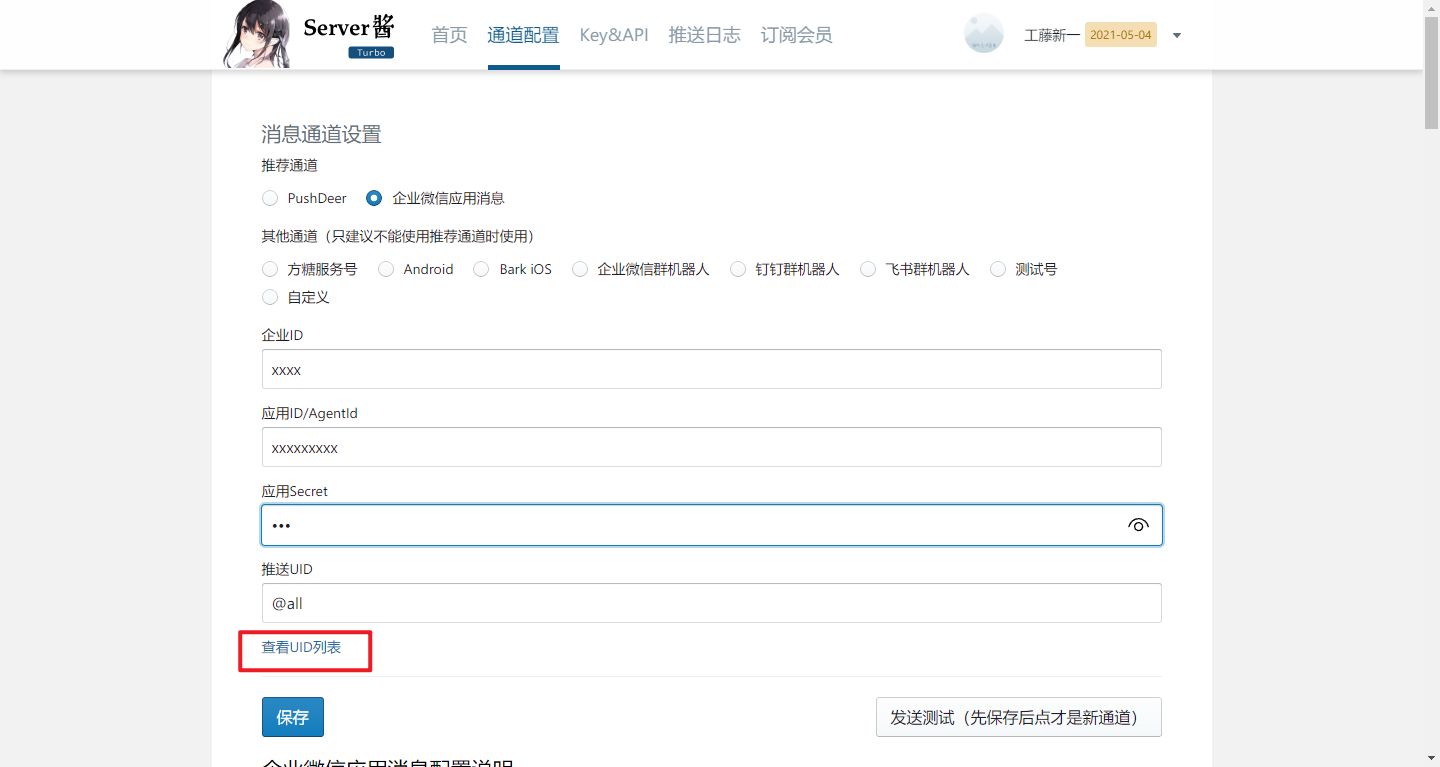
里面的
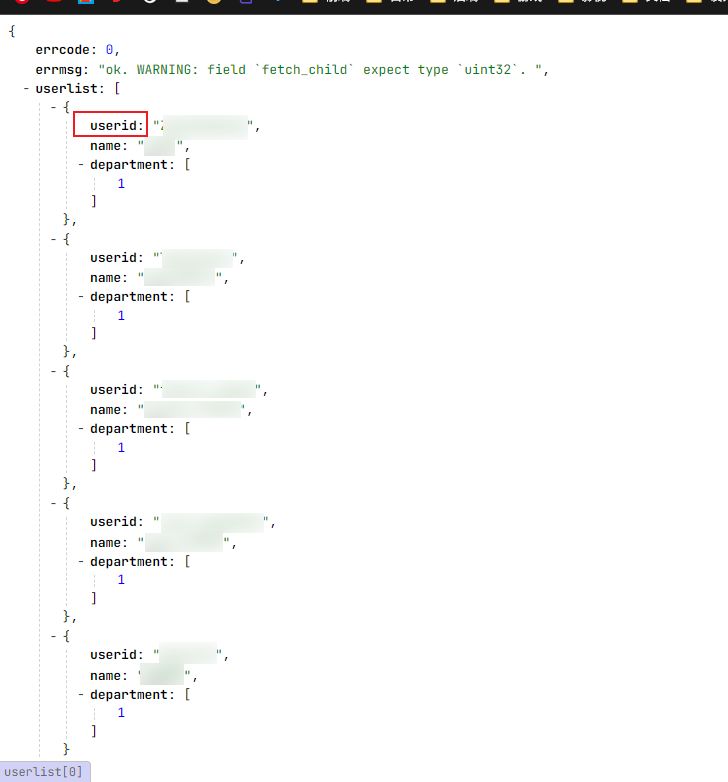
这个就是 用户 ID ,成功将监控项目跑起来之后
添加通知项,选择 pushbullet 里面的 Access Token 填
要通知的
用户 ID或
@all
点击测试,能收到消息即搭建成功
顺便提一嘴
方糖的 PushDeer 也对接成功了
还是那个文件
.\server\notification-providers\pushbullet.js
| const NotificationProvider = require("./notification-provider"); | |
| const axios = require("axios"); | |
| var qs = require('qs'); | |
| const { DOWN, UP } = require("../../src/util"); | |
| class Pushbullet extends NotificationProvider { | |
| name = "pushbullet"; | |
| async send(notification, msg, monitorJSON = null, heartbeatJSON = null) { | |
| let okMsg = "Sent Successfully."; | |
| try { | |
| let pushbulletUrl = "https://sc.ftqq.com/" + notification.pushbulletAccessToken + ".send"; | |
| let config = { | |
| headers: { | |
| "Content-Type": "application/json" | |
| } | |
| }; | |
| if (heartbeatJSON == null) { | |
| let testdata = { | |
| "title": "Uptime Kuma Alert", | |
| "desp": "Testing Successful." | |
| } | |
| // 提交 构造from表单 | |
| var access_token_data = qs.stringify(testdata); | |
| var _config = { | |
| method: 'post', | |
| url: pushbulletUrl, | |
| headers: { | |
| 'Content-Type': 'application/x-www-form-urlencoded' | |
| }, | |
| data : access_token_data | |
| }; | |
| await axios(_config) | |
| } else if (heartbeatJSON["status"] == DOWN) { | |
| let downdata = { | |
| "title": "UptimeKuma Alert: " + monitorJSON["name"], | |
| "desp": "[🔴 Down] " + heartbeatJSON["msg"] + "\nTime (UTC): " + heartbeatJSON["time"], | |
| } | |
| // 提交 构造from表单 | |
| var access_token_data = qs.stringify(downdata); | |
| var _config = { | |
| method: 'post', | |
| url: pushbulletUrl, | |
| headers: { | |
| 'Content-Type': 'application/x-www-form-urlencoded' | |
| }, | |
| data : access_token_data | |
| }; | |
| await axios(_config) | |
| } else if (heartbeatJSON["status"] == UP) { | |
| let updata = { | |
| "title": "UptimeKuma Alert: " + monitorJSON["name"], | |
| "desp": "[✅ Up] " + heartbeatJSON["msg"] + "\nTime (UTC): " + heartbeatJSON["time"], | |
| } | |
| // 提交 构造from表单 | |
| var access_token_data = qs.stringify(updata); | |
| var _config = { | |
| method: 'post', | |
| url: pushbulletUrl, | |
| headers: { | |
| 'Content-Type': 'application/x-www-form-urlencoded' | |
| }, | |
| data : access_token_data | |
| }; | |
| await axios(_config) | |
| } | |
| return okMsg; | |
| } catch (error) { | |
| this.throwGeneralAxiosError(error) | |
| } | |
| } | |
| } | |
| module.exports = Pushbullet; | |
这个针对方糖的订阅用户((
还是那个 pushbullet 通道,Access Token 填成你的就行
类似于
SCT888888XXXXXXXXXXXXXXXXXXXXXXX
这种的,填上测试一下,如果收到消息即对接成功(老规矩要先加上那个 qs 的库)
有问题评论区联系(