前期准备
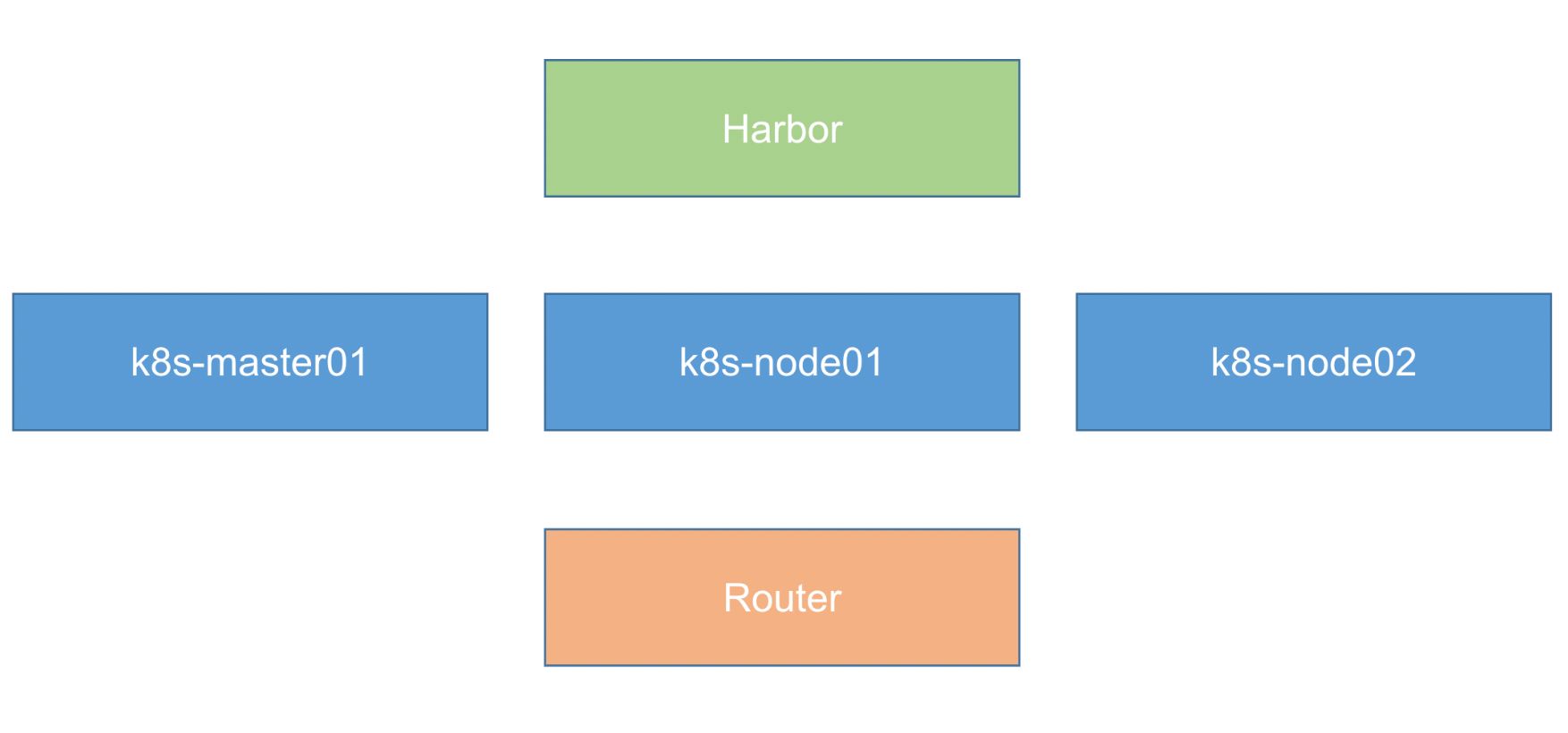
- 使用 KubeAdm 安装集群
- 使用 Centos 7 来安装(内核 4.4 以上)
- 需要4台 Centos7 + 1台软路由
- 软路由使用 KoolShare 来构建
开始操作
1、系统初始化
设置系统主机名以及 Host 文件的相互解析
安装依赖包
设置防火墙为 Iptables 并设置空规则
关闭 SELINUX
调整内核参数,对于 K8S
调整系统时区
关闭系统不需要服务
设置 rsyslogd 和 systemd journald
升级系统内核为 4.44
CentOS 7.x 系统自带的 3.10.x 内核存在一些 Bugs,导致运行的 Docker、Kubernetes 不稳定,例如: rpm -Uvh http://www.elrepo.org/elrepo-release-7.0-3.el7.elrepo.noarch.rpm
2、Kubeadm 部署安装
kube-proxy开启ipvs的前置条件
安装 Docker 软件
安装 Kubeadm (主从配置)
初始化主节点
| [root@k8s-master01 ~] |
| Flag --experimental-upload-certs has been deprecated, use --upload-certs instead |
| [init] Using Kubernetes version: v1.15.1 |
| [preflight] Running pre-flight checks |
| [WARNING SystemVerification]: this Docker version is not on the list of validated versions: 23.0.4. Latest validated version: 18.09 |
| [preflight] Pulling images required for setting up a Kubernetes cluster |
| [preflight] This might take a minute or two, depending on the speed of your internet connection |
| [preflight] You can also perform this action in beforehand using 'kubeadm config images pull' |
| [kubelet-start] Writing kubelet environment file with flags to file "/var/lib/kubelet/kubeadm-flags.env" |
| [kubelet-start] Writing kubelet configuration to file "/var/lib/kubelet/config.yaml" |
| [kubelet-start] Activating the kubelet service |
| [certs] Using certificateDir folder "/etc/kubernetes/pki" |
| [certs] Generating "ca" certificate and key |
| [certs] Generating "apiserver" certificate and key |
| [certs] apiserver serving cert is signed for DNS names [k8s-master01 kubernetes kubernetes.default kubernetes.default.svc kubernetes.default.svc.cluster.local] and IPs [10.96.0.1 172.129.78.136] |
| [certs] Generating "apiserver-kubelet-client" certificate and key |
| [certs] Generating "etcd/ca" certificate and key |
| [certs] Generating "etcd/healthcheck-client" certificate and key |
| [certs] Generating "apiserver-etcd-client" certificate and key |
| [certs] Generating "etcd/server" certificate and key |
| [certs] etcd/server serving cert is signed for DNS names [k8s-master01 localhost] and IPs [172.129.78.136 127.0.0.1 ::1] |
| [certs] Generating "etcd/peer" certificate and key |
| [certs] etcd/peer serving cert is signed for DNS names [k8s-master01 localhost] and IPs [172.129.78.136 127.0.0.1 ::1] |
| [certs] Generating "front-proxy-ca" certificate and key |
| [certs] Generating "front-proxy-client" certificate and key |
| [certs] Generating "sa" key and public key |
| [kubeconfig] Using kubeconfig folder "/etc/kubernetes" |
| [kubeconfig] Writing "admin.conf" kubeconfig file |
| [kubeconfig] Writing "kubelet.conf" kubeconfig file |
| [kubeconfig] Writing "controller-manager.conf" kubeconfig file |
| [kubeconfig] Writing "scheduler.conf" kubeconfig file |
| [control-plane] Using manifest folder "/etc/kubernetes/manifests" |
| [control-plane] Creating static Pod manifest for "kube-apiserver" |
| [control-plane] Creating static Pod manifest for "kube-controller-manager" |
| [control-plane] Creating static Pod manifest for "kube-scheduler" |
| [etcd] Creating static Pod manifest for local etcd in "/etc/kubernetes/manifests" |
| [wait-control-plane] Waiting for the kubelet to boot up the control plane as static Pods from directory "/etc/kubernetes/manifests". This can take up to 4m0s |
| [apiclient] All control plane components are healthy after 17.002118 seconds |
| [upload-config] Storing the configuration used in ConfigMap "kubeadm-config" in the "kube-system" Namespace |
| [kubelet] Creating a ConfigMap "kubelet-config-1.15" in namespace kube-system with the configuration for the kubelets in the cluster |
| [upload-certs] Storing the certificates in Secret "kubeadm-certs" in the "kube-system" Namespace |
| [upload-certs] Using certificate key: |
| 9280d519bb53c33fec7149b1ac2e6f0385b863dcee2ff7bf901d07d715de4dea |
| [mark-control-plane] Marking the node k8s-master01 as control-plane by adding the label "node-role.kubernetes.io/master=''" |
| [mark-control-plane] Marking the node k8s-master01 as control-plane by adding the taints [node-role.kubernetes.io/master:NoSchedule] |
| [bootstrap-token] Using token: abcdef.0123456789abcdef |
| [bootstrap-token] Configuring bootstrap tokens, cluster-info ConfigMap, RBAC Roles |
| [bootstrap-token] configured RBAC rules to allow Node Bootstrap tokens to post CSRs in order for nodes to get long term certificate credentials |
| [bootstrap-token] configured RBAC rules to allow the csrapprover controller automatically approve CSRs from a Node Bootstrap Token |
| [bootstrap-token] configured RBAC rules to allow certificate rotation for all node client certificates in the cluster |
| [bootstrap-token] Creating the "cluster-info" ConfigMap in the "kube-public" namespace |
| [addons] Applied essential addon: CoreDNS |
| [addons] Applied essential addon: kube-proxy |
| |
| Your Kubernetes control-plane has initialized successfully! |
| |
| To start using your cluster, you need to run the following as a regular user: |
| |
| mkdir -p $HOME/.kube |
| sudo cp -i /etc/kubernetes/admin.conf $HOME/.kube/config |
| sudo chown $(id -u):$(id -g) $HOME/.kube/config |
| |
| You should now deploy a pod network to the cluster. |
| Run "kubectl apply -f [podnetwork].yaml" with one of the options listed at: |
| https://kubernetes.io/docs/concepts/cluster-administration/addons/ |
| |
| Then you can join any number of worker nodes by running the following on each as root: |
| |
| kubeadm join 172.129.78.136:6443 --token abcdef.0123456789abcdef \ |
| --discovery-token-ca-cert-hash sha256:a93684cdb29000b025a9ed35054b9611bc913fe1ddbf880f8e9077b812704396 |
加入主节点以及其余工作节点
部署网络
| kubectl apply -f https://raw.githubusercontent.com/coreos/flannel/master/Documentation/kube-flannel.yml |
| |
| |
| |
| [root@k8s-master01 ~] |
| podsecuritypolicy.policy/psp.flannel.unprivileged created |
| clusterrole.rbac.authorization.k8s.io/flannel created |
| clusterrolebinding.rbac.authorization.k8s.io/flannel created |
| serviceaccount/flannel created |
| configmap/kube-flannel-cfg created |
| daemonset.apps/kube-flannel-ds-amd64 created |
| daemonset.apps/kube-flannel-ds-arm64 created |
| daemonset.apps/kube-flannel-ds-arm created |
| daemonset.apps/kube-flannel-ds-ppc64le created |
| daemonset.apps/kube-flannel-ds-s390x created |
| |
| |
| [root@k8s-master01 ~] |
| // 此处不可用为预期状态 下文提供了解决办法 |
| NAME READY STATUS RESTARTS AGE |
| coredns-5c98db65d4-gjnpg 0/1 ContainerCreating 0 16m |
| coredns-5c98db65d4-v89m2 0/1 ContainerCreating 0 16m |
| etcd-k8s-master01 1/1 Running 0 15m |
| kube-apiserver-k8s-master01 1/1 Running 0 15m |
| kube-controller-manager-k8s-master01 1/1 Running 0 15m |
| kube-flannel-ds-amd64-qmksn 1/1 Running 0 2m29s |
| kube-proxy-445g7 1/1 Running 0 16m |
| kube-scheduler-k8s-master01 1/1 Running 0 15m |
| |
| [root@k8s-master01 ~] |
| NAME STATUS ROLES AGE VERSION |
| k8s-master01 Ready master 15m v1.15.1 |
| |
| |
| [root@k8s-master01 ~] |
| docker0: flags=4099<UP,BROADCAST,MULTICAST> mtu 1500 |
| inet 172.17.0.1 netmask 255.255.0.0 broadcast 172.17.255.255 |
| ether 02:42:d3:2f:dc:ce txqueuelen 0 (Ethernet) |
| RX packets 0 bytes 0 (0.0 B) |
| RX errors 0 dropped 0 overruns 0 frame 0 |
| TX packets 0 bytes 0 (0.0 B) |
| TX errors 0 dropped 0 overruns 0 carrier 0 collisions 0 |
| |
| eth0: flags=4163<UP,BROADCAST,RUNNING,MULTICAST> mtu 1500 |
| inet 172.129.78.136 netmask 255.255.255.0 broadcast 172.129.78.255 |
| ether fa:16:3e:36:5c:71 txqueuelen 1000 (Ethernet) |
| RX packets 169718 bytes 339692579 (323.9 MiB) |
| RX errors 0 dropped 0 overruns 0 frame 0 |
| TX packets 83371 bytes 1680809729 (1.5 GiB) |
| TX errors 0 dropped 0 overruns 0 carrier 0 collisions 0 |
| |
| flannel.1: flags=4163<UP,BROADCAST,RUNNING,MULTICAST> mtu 1450 |
| inet 10.244.0.0 netmask 255.255.255.255 broadcast 0.0.0.0 |
| ether ba:df:2f:da:90:4c txqueuelen 0 (Ethernet) |
| RX packets 0 bytes 0 (0.0 B) |
| RX errors 0 dropped 0 overruns 0 frame 0 |
| TX packets 0 bytes 0 (0.0 B) |
| TX errors 0 dropped 0 overruns 0 carrier 0 collisions 0 |
| |
| lo: flags=73<UP,LOOPBACK,RUNNING> mtu 65536 |
| inet 127.0.0.1 netmask 255.0.0.0 |
| loop txqueuelen 1000 (Local Loopback) |
| RX packets 141284 bytes 26146180 (24.9 MiB) |
| RX errors 0 dropped 0 overruns 0 frame 0 |
| TX packets 141284 bytes 26146180 (24.9 MiB) |
| TX errors 0 dropped 0 overruns 0 carrier 0 collisions 0 |
| |
| [root@k8s-node01 ~] |
| --discovery-token-ca-cert-hash sha256:a93684cdb29000b025a9ed35054b9611bc913fe1ddbf880f8e9077b812704396 |
| [preflight] Running pre-flight checks |
| [WARNING SystemVerification]: this Docker version is not on the list of validated versions: 23.0.4. Latest validated version: 18.09 |
| [WARNING Hostname]: hostname "k8s-node01.novalocal" could not be reached |
| [WARNING Hostname]: hostname "k8s-node01.novalocal": lookup k8s-node01.novalocal on 223.5.5.5:53: no such host |
| [preflight] Reading configuration from the cluster... |
| [preflight] FYI: You can look at this config file with 'kubectl -n kube-system get cm kubeadm-config -oyaml' |
| [kubelet-start] Downloading configuration for the kubelet from the "kubelet-config-1.15" ConfigMap in the kube-system namespace |
| [kubelet-start] Writing kubelet configuration to file "/var/lib/kubelet/config.yaml" |
| [kubelet-start] Writing kubelet environment file with flags to file "/var/lib/kubelet/kubeadm-flags.env" |
| [kubelet-start] Activating the kubelet service |
| [kubelet-start] Waiting for the kubelet to perform the TLS Bootstrap... |
| |
| This node has joined the cluster: |
| * Certificate signing request was sent to apiserver and a response was received. |
| * The Kubelet was informed of the new secure connection details. |
| |
| Run 'kubectl get nodes' on the control-plane to see this node join the cluster. |
| |
| [root@k8s-master01 ~] |
| NAME STATUS ROLES AGE VERSION |
| k8s-master01 Ready master 19m v1.15.1 |
| k8s-node01.novalocal NotReady <none> 13s v1.15.1 |
| k8s-node02.novalocal NotReady <none> 6s v1.15.1 |
| [root@k8s-master01 ~] |
| // 此处不可用为预期状态 下文提供了解决办法 |
| NAME READY STATUS RESTARTS AGE IP NODE NOMINATED NODE READINESS GATES |
| coredns-5c98db65d4-gjnpg 0/1 ContainerCreating 0 19m <none> k8s-master01 <none> <none> |
| coredns-5c98db65d4-v89m2 0/1 ContainerCreating 0 19m <none> k8s-master01 <none> <none> |
| etcd-k8s-master01 1/1 Running 0 18m 172.129.78.136 k8s-master01 <none> <none> |
| kube-apiserver-k8s-master01 1/1 Running 0 18m 172.129.78.136 k8s-master01 <none> <none> |
| kube-controller-manager-k8s-master01 1/1 Running 0 18m 172.129.78.136 k8s-master01 <none> <none> |
| kube-flannel-ds-amd64-fcgkv 1/1 Running 0 35s 172.129.78.105 k8s-node01.novalocal <none> <none> |
| kube-flannel-ds-amd64-qmksn 1/1 Running 0 5m17s 172.129.78.136 k8s-master01 <none> <none> |
| kube-flannel-ds-amd64-wgjmq 1/1 Running 0 28s 172.129.78.104 k8s-node02.novalocal <none> <none> |
| kube-proxy-445g7 1/1 Running 0 19m 172.129.78.136 k8s-master01 <none> <none> |
| kube-proxy-dwljn 1/1 Running 0 35s 172.129.78.105 k8s-node01.novalocal <none> <none> |
| kube-proxy-wfx4j 1/1 Running 0 28s 172.129.78.104 k8s-node02.novalocal <none> <none> |
| kube-scheduler-k8s-master01 1/1 Running 0 18m 172.129.78.136 k8s-master01 <none> <none> |
| [root@k8s-master01 ~] |
| NAME STATUS ROLES AGE VERSION |
| k8s-master01 Ready master 19m v1.15.1 |
| k8s-node01.novalocal Ready <none> 38s v1.15.1 |
| k8s-node02.novalocal Ready <none> 31s v1.15.1 |
解决报错
CoreDNS / flannel 一直处于 ContainerCreating 状态
| [root@k8s-master01 ~] |
| NAME READY STATUS RESTARTS AGE IP NODE NOMINATED NODE READINESS GATES |
| coredns-5c98db65d4-gjnpg 0/1 ContainerCreating 0 19m <none> k8s-master01 <none> <none> |
| coredns-5c98db65d4-v89m2 0/1 ContainerCreating 0 19m <none> k8s-master01 <none> <none> |
| |
| [root@k8s-master01 ~] |
| ... |
| Events: |
| Type Reason Age From Message |
| ---- ------ ---- ---- ------- |
| Normal SandboxChanged 32m (x1132 over 4h37m) kubelet, k8s-master01.novalocal Pod sandbox changed, it will be killed and re-created. |
| |
| |
| [root@k8s-master01 ~] |
| Apr 22 23:06:49 k8s-master01.novalocal kubelet[29592]: E0422 23:06:49.663339 29592 kuberuntime_gc.go:170] Failed to stop sandbox "5924b44e76f68d801163e3e53762cd85f25692821690fc0f5f11c58d640e65ed" before removing: rpc error: code = Unknown desc = NetworkPlugin cni failed to teardown pod "coredns-5c98db65d4-sx9z5_kube-system" network: failed to find plugin "flannel" in path [/opt/cni/bin] |
| Apr 22 23:06:54 k8s-master01.novalocal kubelet[29592]: W0422 23:06:54.472770 29592 cni.go:309] CNI failed to retrieve network namespace path: cannot find network namespace for the terminated container "81f56d50bac714133bbbc0132b378d5a57383203050febb5ad36c8a7d5cf022f" |
| Apr 22 23:06:54 k8s-master01.novalocal kubelet[29592]: E0422 23:06:54.478568 29592 cni.go:352] Error deleting kube-system_coredns-5c98db65d4-nf2xb/81f56d50bac714133bbbc0132b378d5a57383203050febb5ad36c8a7d5cf022f from network flannel/cbr0: failed to find plugin "flannel" in path [/opt/cni/bin] |
| Apr 22 23:06:54 k8s-master01.novalocal kubelet[29592]: E0422 23:06:54.479098 29592 remote_runtime.go:128] StopPodSandbox "81f56d50bac714133bbbc0132b378d5a57383203050febb5ad36c8a7d5cf022f" from runtime service failed: rpc error: code = Unknown desc = NetworkPlugin cni failed to teardown pod "coredns-5c98db65d4-nf2xb_kube-system" network: failed to find plugin "flannel" in path [/opt/cni/bin] |
| Apr 22 23:06:54 k8s-master01.novalocal kubelet[29592]: E0422 23:06:54.479146 29592 kuberuntime_manager.go:845] Failed to stop sandbox {"docker" "81f56d50bac714133bbbc0132b378d5a57383203050febb5ad36c8a7d5cf022f"} |
| Apr 22 23:06:54 k8s-master01.novalocal kubelet[29592]: E0422 23:06:54.479200 29592 kuberuntime_manager.go:640] killPodWithSyncResult failed: failed to "KillPodSandbox" for "db56e197-6d03-4628-984b-2694f5da5edc" with KillPodSandboxError: "rpc error: code = Unknown desc = NetworkPlugin cni failed to teardown pod \"coredns-5c98db65d4-nf2xb_kube-system\" network: failed to find plugin \"flannel\" in path [/opt/cni/bin]" |
| Apr 22 23:06:54 k8s-master01.novalocal kubelet[29592]: E0422 23:06:54.479222 29592 pod_workers.go:190] Error syncing pod db56e197-6d03-4628-984b-2694f5da5edc ("coredns-5c98db65d4-nf2xb_kube-system(db56e197-6d03-4628-984b-2694f5da5edc)"), skipping: failed to "KillPodSandbox" for "db56e197-6d03-4628-984b-2694f5da5edc" with KillPodSandboxError: "rpc error: code = Unknown desc = NetworkPlugin cni failed to teardown pod \"coredns-5c98db65d4-nf2xb_kube-system\" network: failed to find plugin \"flannel\" in path [/opt/cni/bin]" |
| Apr 22 23:07:01 k8s-master01.novalocal kubelet[29592]: W0422 23:07:01.472361 29592 cni.go:309] CNI failed to retrieve network namespace path: cannot find network namespace for the terminated container "3d132d33ad7a6256158167561dcfc2ffbd76398ec61daadecae244d9ff80d73e" |
| Apr 22 23:07:01 k8s-master01.novalocal kubelet[29592]: E0422 23:07:01.477122 29592 cni.go:352] Error deleting kube-system_coredns-5c98db65d4-dhv45/3d132d33ad7a6256158167561dcfc2ffbd76398ec61daadecae244d9ff80d73e from network flannel/cbr0: failed to find plugin "flannel" in path [/opt/cni/bin] |
| Apr 22 23:07:01 k8s-master01.novalocal kubelet[29592]: E0422 23:07:01.477687 29592 remote_runtime.go:128] StopPodSandbox "3d132d33ad7a6256158167561dcfc2ffbd76398ec61daadecae244d9ff80d73e" from runtime service failed: rpc error: code = Unknown desc = NetworkPlugin cni failed to teardown pod "coredns-5c98db65d4-dhv45_kube-system" network: failed to find plugin "flannel" in path [/opt/cni/bin] |
| Apr 22 23:07:01 k8s-master01.novalocal kubelet[29592]: E0422 23:07:01.477733 29592 kuberuntime_manager.go:845] Failed to stop sandbox {"docker" "3d132d33ad7a6256158167561dcfc2ffbd76398ec61daadecae244d9ff80d73e"} |
| Apr 22 23:07:01 k8s-master01.novalocal kubelet[29592]: E0422 23:07:01.477805 29592 kuberuntime_manager.go:640] killPodWithSyncResult failed: failed to "KillPodSandbox" for "d70ce214-46c7-4d89-aa39-7c437e430ec4" with KillPodSandboxError: "rpc error: code = Unknown desc = NetworkPlugin cni failed to teardown pod \"coredns-5c98db65d4-dhv45_kube-system\" network: failed to find plugin \"flannel\" in path [/opt/cni/bin]" |
| Apr 22 23:07:01 k8s-master01.novalocal kubelet[29592]: E0422 23:07:01.478155 29592 pod_workers.go:190] Error syncing pod d70ce214-46c7-4d89-aa39-7c437e430ec4 ("coredns-5c98db65d4-dhv45_kube-system(d70ce214-46c7-4d89-aa39-7c437e430ec4)"), skipping: failed to "KillPodSandbox" for "d70ce214-46c7-4d89-aa39-7c437e430ec4" with KillPodSandboxError: "rpc error: code = Unknown desc = NetworkPlugin cni failed to teardown pod \"coredns-5c98db65d4-dhv45_kube-system\" network: failed to find plugin \"flannel\" in path [/opt/cni/bin]" |
| |
| |
| |
| // https://github.com/containernetworking/plugins/releases/tag/v0.8.6 |
| // https://blog.csdn.net/qq_29385297/article/details/127682552 |
| [root@k8s-master01 ~] |
| [root@k8s-master01 bin] |
| total 52828 |
| drwxr-xr-x. 2 root root 263 Apr 22 23:07 . |
| drwxr-xr-x. 3 root root 17 Apr 22 18:39 .. |
| -rwxr-xr-x. 1 root root 2782728 Jan 19 05:09 bandwidth |
| -rwxr-xr-x. 1 root root 3104192 Jan 19 05:09 bridge |
| -rwxr-xr-x. 1 root root 7607056 Jan 19 05:09 dhcp |
| -rwxr-xr-x. 1 root root 2863024 Jan 19 05:09 dummy |
| -rwxr-xr-x. 1 root root 3165352 Jan 19 05:09 firewall |
| -rwxr-xr-x. 1 root root 2775224 Jan 19 05:09 host-device |
| -rwxr-xr-x. 1 root root 2332792 Jan 19 05:09 host-local |
| -rwxr-xr-x. 1 root root 2871792 Jan 19 05:09 ipvlan |
| -rwxr-xr-x. 1 root root 2396976 Jan 19 05:09 loopback |
| -rwxr-xr-x. 1 root root 2893624 Jan 19 05:09 macvlan |
| -rwxr-xr-x. 1 root root 2689440 Jan 19 05:09 portmap |
| -rwxr-xr-x. 1 root root 3000032 Jan 19 05:09 ptp |
| -rwxr-xr-x. 1 root root 2542400 Jan 19 05:09 sbr |
| -rwxr-xr-x. 1 root root 2074072 Jan 19 05:09 static |
| -rwxr-xr-x. 1 root root 2456920 Jan 19 05:09 tuning |
| -rwxr-xr-x. 1 root root 2867512 Jan 19 05:09 vlan |
| -rwxr-xr-x. 1 root root 2566424 Jan 19 05:09 vrf |
| [root@k8s-master01 ~] |
| [root@k8s-master01 ~] |
| |
| // 再次查看即正常! |
| [root@k8s-master01 bin] |
| NAMESPACE NAME READY STATUS RESTARTS AGE |
| default nginx-deployment-68c7f5464c-5722g 1/1 Running 0 26m |
| kube-system coredns-5c98db65d4-dhv45 1/1 Running 0 4h41m |
| kube-system coredns-5c98db65d4-nf2xb 1/1 Running 0 4h42m |
| kube-system etcd-k8s-master01.novalocal 1/1 Running 0 4h49m |
| kube-system kube-apiserver-k8s-master01.novalocal 1/1 Running 0 4h49m |
| kube-system kube-controller-manager-k8s-master01.novalocal 1/1 Running 0 4h49m |
| kube-system kube-flannel-ds-amd64-4whrn 1/1 Running 0 30m |
| kube-system kube-flannel-ds-amd64-sdhf9 1/1 Running 0 30m |
| kube-system kube-flannel-ds-amd64-xm267 1/1 Running 0 150m |
| kube-system kube-proxy-cmpjd 1/1 Running 0 4h50m |
| kube-system kube-proxy-qcwzl 1/1 Running 0 30m |
| kube-system kube-proxy-sj5cm 1/1 Running 0 30m |
| kube-system kube-scheduler-k8s-master01.novalocal 1/1 Running 0 4h49m |
部署测试
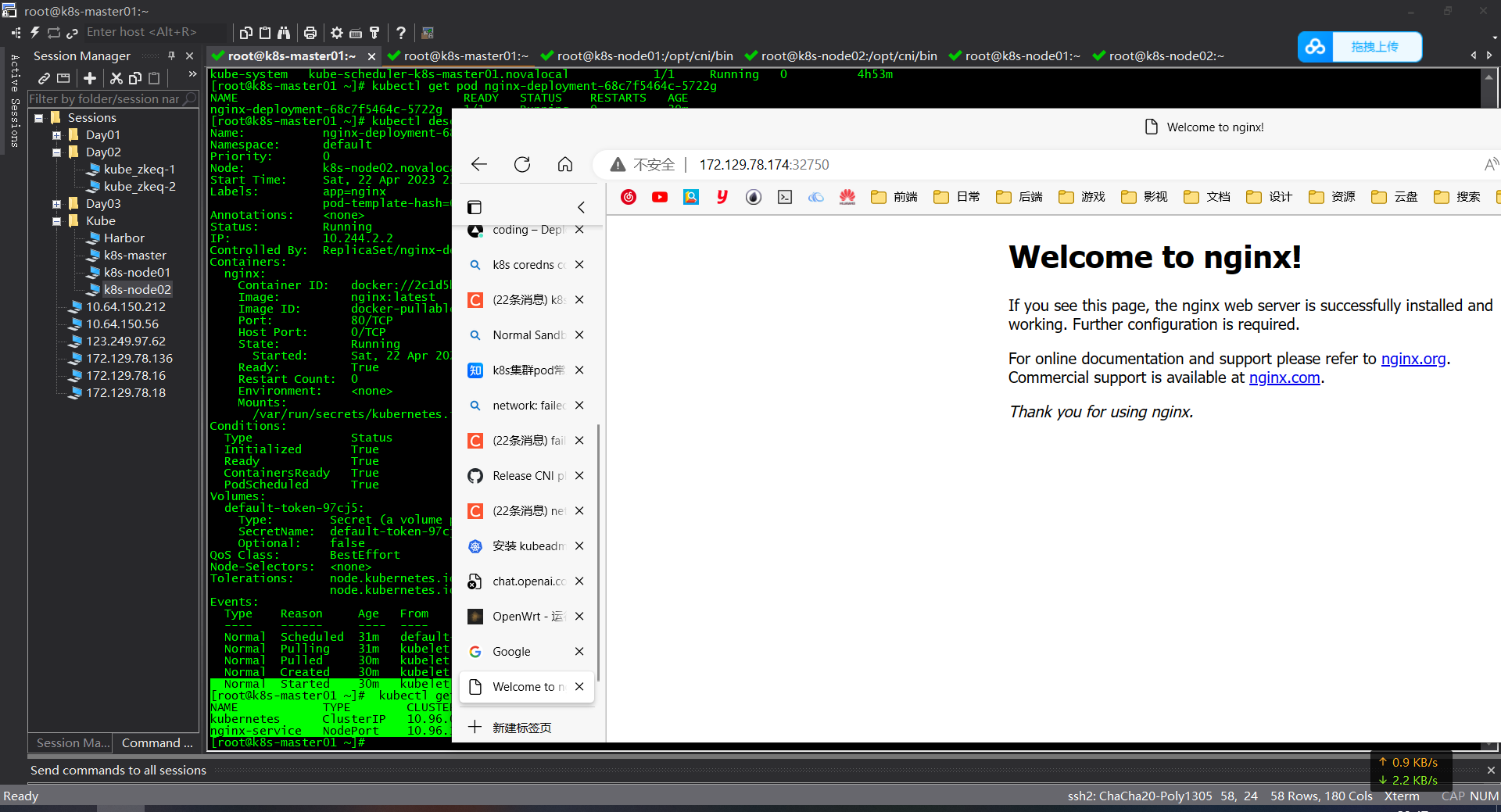
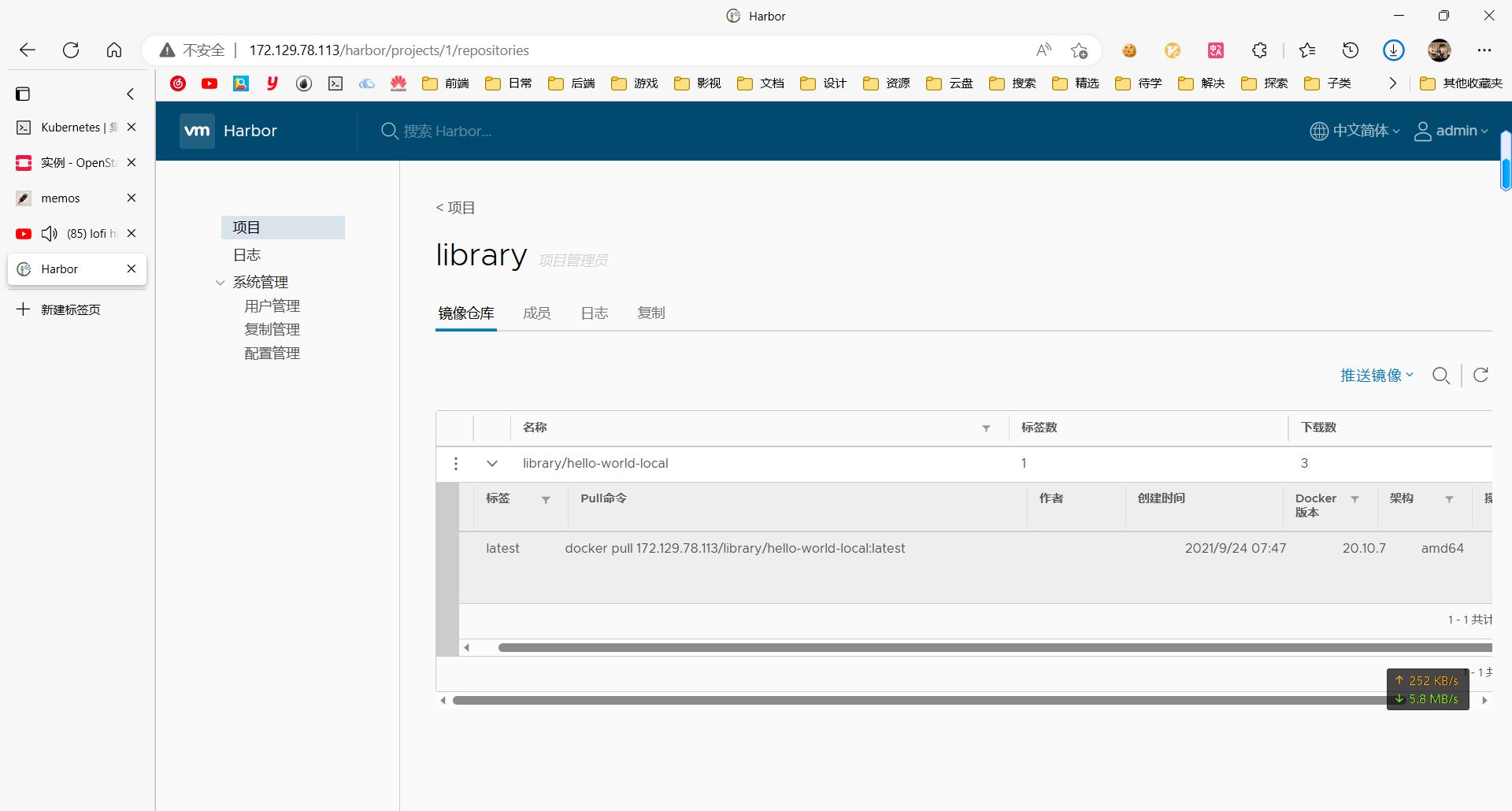
Harbor - 企业级 Docker 私有仓库
配置 HTTP 仓库
要在 Docker 中使用 HTTP 仓库,需要在 daemon.json 文件中进行配置。以下是实现方法:
- 首先,打开终端并输入以下命令:
- 在打开的文件中,添加以下内容:
其中,http://example.com:5000 是你所使用的 HTTP 仓库的地址。
- 保存并退出文件。
- 重启 Docker 服务:
现在,你已经成功地配置了 Docker 使用 HTTP 仓库。可以使用以下命令检查是否已成功配置:
在输出的结果中,应该能看到配置的 HTTP 仓库地址。
参考资料